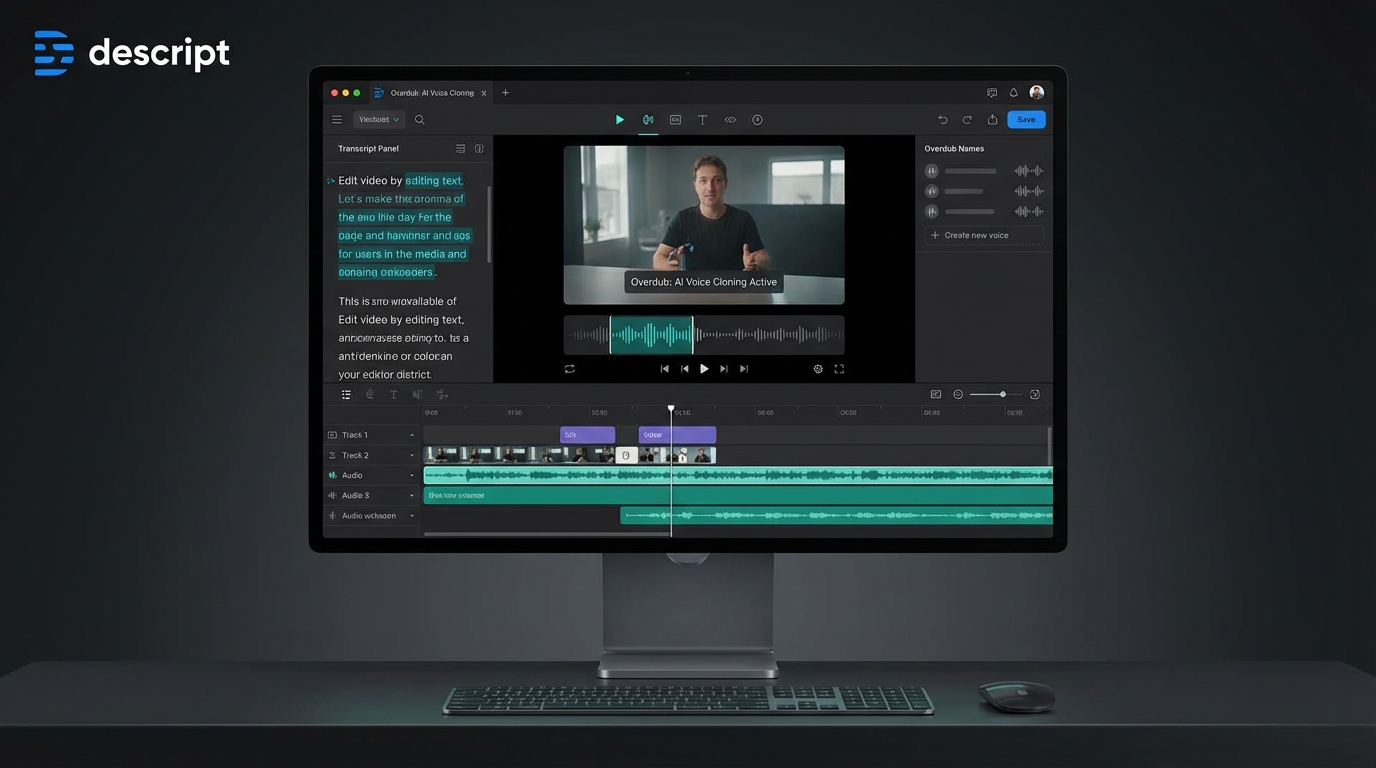
The Future of Video Editing is Text-Based
This post contains affiliate links. If you make a purchase, I may earn a commission
In the rapidly evolving landscape of AI-powered content creation tools, Descript has emerged as a revolutionary platform that fundamentally changes how creators approach video and audio editing. Instead of wrestling with complex timelines and precise cuts, Descript allows you to edit your videos and podcasts by simply editing text—like editing a document. This innovative approach has made professional-quality video editing accessible to podcasters, YouTubers, marketers, and teams who previously found traditional editing tools intimidating or time-consuming.
What sets Descript apart in 2026 is its comprehensive suite of over 30 AI-powered tools that go far beyond basic transcription. From voice cloning with Overdub to AI-powered audio enhancement with Studio Sound, Descript has positioned itself as an all-in-one content creation platform. In this comprehensive review, we’ll explore everything you need to know about Descript in 2026—its features, pricing, strengths, limitations, and how it compares to competitors in the increasingly crowded AI video editing space.
Key Features: What Makes Descript Stand Out
Text-Based Video and Audio Editing
The core innovation that defines Descript is its text-based editing interface. When you upload a video or audio file, Descript automatically transcribes the content with high accuracy. You can then edit your media by simply modifying the transcript—delete a sentence, and that portion disappears from your video; rearrange paragraphs, and your footage reorganizes accordingly. This approach reduces editing time by an estimated 60-70%, making it ideal for content creators who produce regular podcasts, video interviews, webinars, or educational content.
Overdub: AI Voice Cloning Technology
Overdub is Descript’s voice cloning feature that allows you to create an AI-generated version of your voice. After recording a brief training sample, you can type any text and have it spoken in your voice. This is incredibly useful for fixing mistakes, updating outdated information in videos, or creating content without recording new audio. The technology has improved significantly, producing natural-sounding speech that’s nearly indistinguishable from your actual voice in most contexts.
Studio Sound: Professional Audio Enhancement
Studio Sound uses AI to transform audio recorded in less-than-ideal conditions into studio-quality sound. It removes background noise, echo, and room tone while enhancing voice clarity. This feature is particularly valuable for podcasters and video creators who don’t have access to professional recording studios or expensive microphone setups. However, it’s worth noting that Studio Sound now operates on a credit system introduced in late 2025, which means heavy users may incur additional costs.
Automatic Filler Word Removal
One of the most time-saving features is Descript’s ability to automatically detect and remove filler words like “um,” “uh,” “like,” and “you know.” What would traditionally take hours of manual editing can be accomplished with a single click. The AI is smart enough to remove awkward pauses while maintaining natural speech patterns and pacing.
Screen Recording and Capture
Descript includes built-in screen recording capabilities, making it a complete solution for creating tutorial videos, product demos, and presentations. You can record your screen, webcam, and microphone simultaneously, then edit everything using the same text-based interface. This integration eliminates the need for separate screen recording software and simplifies the workflow for educational content creators and SaaS companies.
AI Video Generation and Underlord AI
In 2026, Descript has expanded beyond editing into AI-powered video creation with features like Underlord AI. These tools help automate repetitive tasks, suggest edits, and even generate visual elements based on your content. While not as advanced as dedicated AI video generation platforms like Runway or Pika, these features add significant value for creators who want to enhance their videos without manual design work.
Collaboration and Team Features
Descript offers robust collaboration tools that allow multiple team members to work on projects simultaneously. You can leave comments, suggest edits, and track changes—similar to collaborative document editing in Google Docs or Microsoft Word. This makes it particularly valuable for content teams, agencies, and businesses producing regular video content.
Transcription Accuracy and Speed
Descript’s transcription engine delivers high accuracy, typically in the 90-95% range for clear audio. The transcription process is fast, usually completing within minutes for standard-length content. The platform supports multiple languages and can identify different speakers, making it suitable for interviews and multi-person podcasts.
Pricing: Understanding Descript’s Cost Structure in 2026
Descript’s pricing model has evolved in 2026 to include both subscription tiers and a credit-based system for certain AI features. Here’s what you need to know:
Free Plan
Descript offers a free plan that allows you to test the platform’s core features. This includes basic transcription and editing capabilities, making it suitable for casual users or those evaluating whether Descript fits their workflow. However, the free plan has limitations on transcription hours, export quality, and access to advanced AI features.
Paid Subscriptions
Paid plans start at approximately $16 per month when billed annually. These subscriptions unlock higher transcription limits, access to AI tools like Overdub and Studio Sound, collaboration features, and higher-quality exports. Mid-tier and enterprise plans offer additional features like priority support, custom branding, and advanced team management capabilities.
Credit-Based AI Features
An important change introduced in late 2025 is the credit system for premium AI features. Tools like Studio Sound and certain Overdub functions now consume credits, which are allocated based on your subscription tier. Heavy users may need to purchase additional credits, which can increase costs at scale. This shift has been somewhat controversial among long-time users who previously had unlimited access to these features.
Value Assessment
For content creators who regularly produce podcasts, YouTube videos, or educational content, Descript’s pricing represents good value given the time savings and integrated toolset. The ability to replace multiple separate tools (transcription service, audio editor, video editor, screen recorder) with a single platform can justify the cost. However, occasional users or those primarily needing transcription might find more affordable alternatives like Otter.ai or Sonix.
Pros and Cons: The Complete Picture
Advantages
- Revolutionary text-based editing: The intuitive editing interface dramatically reduces editing time and makes professional editing accessible to non-technical users.
- All-in-one platform: Combines transcription, video editing, audio editing, screen recording, and AI tools in one application, eliminating the need for multiple separate tools.
- Time savings: Reduces editing time by 60-70% compared to traditional timeline-based editors, especially for interview and podcast content.
- Overdub voice cloning: Enables quick corrections and updates without re-recording, saving significant time for content updates.
- Studio Sound quality: Transforms poor-quality audio into professional sound without expensive equipment or acoustic treatment.
- Strong collaboration features: Real-time collaboration and commenting make it ideal for teams and agencies.
- Regular updates: Descript consistently adds new AI features and improvements, with over 30 AI tools available in 2026.
- Cross-platform compatibility: Available on Windows, Mac, and web, with good performance across devices.
Limitations
- Credit system concerns: The introduction of credits for premium AI features can lead to unexpected costs for heavy users.
- Learning curve for advanced features: While basic editing is intuitive, mastering all 30+ AI tools and advanced features requires time investment.
- Not ideal for complex motion graphics: Descript excels at content editing but isn’t designed for advanced visual effects or motion graphics work.
- Transcription accuracy varies: While generally good, accuracy drops with poor audio quality, heavy accents, or technical jargon.
- Export rendering times: Large projects with multiple effects can take considerable time to render and export.
- Subscription required for best features: The free plan is quite limited, and most valuable features require a paid subscription.
- Internet connection dependency: Many AI features require an active internet connection, limiting offline editing capabilities.
Use Cases: Who Should Use Descript?
Podcasters
Descript is arguably the best tool available for podcast editing. The ability to edit by text, automatically remove filler words, enhance audio quality with Studio Sound, and create video versions for platforms like YouTube makes it the go-to choice for podcast producers.
YouTube Content Creators
YouTubers who create talking-head videos, interviews, vlogs, or educational content will find Descript’s workflow significantly faster than traditional video editors. The automatic caption generation and ability to quickly cut out mistakes or rambling sections is invaluable for regular content production.
Marketing Teams and Agencies
Marketing professionals creating webinar recordings, product demos, customer testimonials, or social media video content benefit from Descript’s collaboration features and rapid editing workflow. The ability to quickly repurpose long-form content into shorter clips is particularly valuable.
Educators and Course Creators
Online course creators and educators can use Descript’s screen recording and editing features to create professional-quality tutorial videos and lectures. The transcription feature also helps create accessibility-compliant content with accurate captions.
Corporate Communications
Companies producing internal training videos, town halls, or external communications can leverage Descript’s team features and professional output quality without requiring dedicated video production specialists.
Alternatives: How Descript Compares to Competitors
Opus Clip
Opus Clip specializes in automatically creating short-form clips from long-form videos, making it ideal for social media repurposing. While more limited in scope than Descript, it excels at this specific use case with AI-powered viral clip identification and automatic captioning.
CapCut
CapCut offers powerful video editing features with a focus on social media content creation. It’s completely free and includes impressive AI features, but lacks Descript’s transcription-based editing approach and podcast-specific tools.
Pictory
Pictory focuses on converting scripts and blog posts into videos with stock footage and AI voiceovers. It’s more specialized for marketing content creation than general editing, making it complementary rather than directly competitive to Descript.
Otter.ai
Otter.ai is primarily a transcription and note-taking tool with 95% accuracy and strong meeting collaboration features. It’s more affordable than Descript but lacks video editing capabilities, making it suitable for those who only need transcription.
Adobe Premiere Pro
For users needing advanced video effects, color grading, and motion graphics, Adobe Premiere Pro remains the professional standard. However, it has a steeper learning curve and higher cost, and lacks Descript’s AI-powered productivity features.
Sonix
Sonix offers professional-grade transcription with support for 40+ languages and reasonable pricing. It provides basic editing but doesn’t match Descript’s comprehensive video editing capabilities.
Is Descript Right for You in 2026?
Descript has solidified its position as one of the most innovative and practical tools in the AI video editing landscape. Its text-based editing approach genuinely transforms the content creation workflow, making professional-quality video and audio editing accessible to creators who don’t have traditional editing skills or the time for complex timeline manipulation.
The platform is particularly compelling for podcasters, YouTubers creating interview or talking-head content, marketing teams, and educators. If you regularly produce content where the spoken word is central—rather than elaborate visual effects—Descript can reduce your editing time by more than half while maintaining or improving output quality.
However, the introduction of credit-based pricing for premium AI features is a consideration for high-volume users. The subscription cost at $16/month is reasonable for regular creators, but you should factor in potential additional credit purchases if you plan to heavily use Studio Sound or other premium AI features.
For those seeking alternatives, consider your primary use case: Otter.ai or Sonix if you mainly need transcription, CapCut for free social media editing, or traditional tools like Adobe Premiere Pro for complex visual projects. But if you want an all-in-one platform that makes editing as easy as editing text, with powerful AI features that genuinely save time, Descript in 2026 remains the best choice in its category.
The platform’s commitment to innovation—adding over 30 AI tools and continuously improving features like Underlord AI—suggests that Descript will continue to evolve and lead in the text-based editing space. For content creators who value efficiency, accessibility, and cutting-edge AI assistance, Descript is an investment that pays dividends in time saved and content quality improved.







