Creating compelling explainer videos no longer requires expensive studios, professional videographers, or advanced editing skills. AI-powered video tools have democratized video creation, enabling businesses, educators, and marketers to produce professional-quality explainer videos in minutes instead of days.
Whether you’re simplifying complex product features, onboarding new customers, or boosting conversion rates with visual storytelling, the right AI video tool can transform your communication strategy. In this comprehensive guide, we compared the 7 best AI video tools specifically optimized for explainer videos in 2026.
From text-to-video automation to AI avatars and multilingual support, these platforms offer powerful features that simplify creation, maximize engagement, and drive conversions. Let’s dive into the tools that are reshaping how businesses explain their value propositions.
Best AI Video Tools for Explainer Videos in 2026
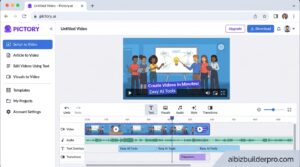
1. Pictory – Best for Blog-to-Video Conversion
What It Does: Pictory transforms written content into professional explainer videos using AI-powered script analysis, automatic scene matching, and intelligent visual selection from millions of stock assets.
Best Use Case: Marketing teams repurposing blog content, educational institutions creating course materials, and content creators turning articles into engaging video explainers.
Pricing:
- Starter: $25/month (200 min/month, 720p, 5GB storage)
- Professional: $35/month (600 min/month, 1080p, 20GB storage) – Best value
- Team: $119/month (1,800 min/month, 100GB storage, team collaboration)
- Enterprise: Custom pricing with API access and dedicated support
Pros:
- Seamless blog-to-video conversion with URL import
- 5-18 million stock videos and images (Getty & Storyblocks)
- AI voiceovers in 29 languages via ElevenLabs integration
- Text-based editing for quick scene removal
- Auto-captioning for accessibility and SEO
Cons:
- Limited customization on lower-tier plans
- AI-generated scenes sometimes require manual adjustment
- Export limits can be restrictive for high-volume users
2. InVideo AI – Best for AI-Powered Script Generation
What It Does: InVideo AI leverages advanced AI agents to generate complete explainer videos from simple text prompts, handling script writing, scene selection, voiceover, music, and subtitles automatically.
Best Use Case: Social media marketers creating quick explainers, product demo videos, and multilingual content for global audiences.
Pricing:
- Free: $0 (10 min/week AI, 720p, watermarked)
- Plus: $20/month (50 min/month AI, 1080p, no watermark, 80 iStock assets)
- Max: $50/month (200 min/month AI, 4K export, 5 voice clones)
- Annual billing offers 20% discount
Pros:
- Sora 2 Pro and Veo 3.1 model integration for cutting-edge AI video
- AI avatars with realistic lip-sync under 50ms latency
- 50+ language support with automated translation
- Vector search over 20M+ stock assets for precise matching
- Generates 5-minute videos in under 60 seconds
Cons:
- Credit system adds complexity for budgeting
- Premium features (voices, iStock assets) consume additional credits
- Learning curve for advanced customization
Read our full InVideo AI review
3. Lumen5 – Best for Fast Content Repurposing
What It Does: Lumen5 specializes in rapid content transformation, converting blog posts, articles, and scripts into branded explainer videos with AI-powered media matching and automated formatting.
Best Use Case: B2B marketing teams, content publishers, and agencies needing consistent brand-aligned explainer videos at scale.
Pricing:
- Free: $0 (5 videos/month, 2-min max, 720p, branded outro)
- Basic: $19/month (3,500 AI credits, 720p, no branding)
- Starter: $59/month (12,000 AI credits, 1080p, 50M+ stock assets) – Most popular
- Pro: $149/month (36,000 AI credits, 500M stock assets, custom watermarks)
- Enterprise: Custom (team collaboration, SSO, video approval workflows)
Pros:
- Videos completed in under 10 minutes
- Blueprints for brand consistency (locked colors, fonts, logos)
- 500M+ stock photos and videos on Pro tier
- AI script composer with voiceover integration
- Video approval workflow for team collaboration
Cons:
- Free plan includes Lumen5 watermark
- Templates can look generic without customization
- 720p limitation on Basic plan
- Higher pricing compared to some competitors
4. Animaker – Best for Character-Based Explainers
What It Does: Animaker combines drag-and-drop animation with billions of character combinations, enabling businesses to create engaging character-driven explainer videos with auto lip-sync and smart animation.
Best Use Case: Training videos, HR communications, educational content, and businesses needing branded character mascots for consistent storytelling.
Pricing:
- Free: $0 (testing only, watermarked)
- Basic: $10-20/month annual (HD 720p, 5 min max, 5 exports/month)
- Starter: $19-35/month annual (Full HD 1080p, 15 min max, 10 exports/month)
- Pro: $43-79/month annual (2K quality, 30 min max, full commercial rights)
- Enterprise: Custom (4K, unlimited, reseller rights)
Pros:
- Billions of custom character combinations
- 2000+ text-to-speech voices in 200+ languages
- Auto lip-sync with character animations
- Smart Move one-click animation engine
- 100M+ stock media assets included
- Full commercial rights on Pro plan
Cons:
- Export overage charges ($10-20 per extra export)
- Premium stock assets cost extra ($1-5 each)
- Browser-only, no desktop app
- Ambiguous commercial rights on Starter plan
5. Vyond – Best for Enterprise Explainer Videos
What It Does: Vyond is an enterprise-grade AI video platform trusted by 65% of Fortune 500 companies, offering advanced collaboration, brand management, and text-to-video AI with professional-quality output.
Best Use Case: Large organizations, L&D departments, corporate communications teams, and agencies creating client-facing explainer content.
Pricing:
- Starter: $699/year ($58/month) – 1 user, 10,000 credits/month
- Professional: $1,199/year ($100/month) – Team collaboration, Shutterstock integration
- Enterprise: $1,649/year ($137/month) – SSO, brand suite, unlimited credits
- Agency: $1,999/year ($167/month) – Commercial rights transfers included
Pros:
- Vyond Go AI: text-to-video, doc-to-video, URL-to-video
- 650+ AI text-to-speech voices
- Instant translation into 80+ languages
- SOC 2 compliance for enterprise security
- 4M+ Shutterstock assets on Professional plan
- 90-minute video limit on Enterprise tier
Cons:
- High pricing barrier for small businesses and solopreneurs
- Annual billing required for Enterprise/Agency
- Steeper learning curve than simpler competitors
- Credit-based system can be confusing
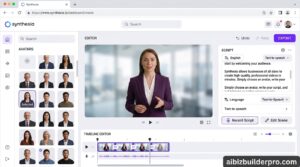
6. Synthesia – Best for AI Avatar Presenters
What It Does: Synthesia specializes in AI avatar-powered videos, enabling businesses to create professional presenter-style explainer videos without cameras, actors, or studios using 240+ realistic AI avatars.
Best Use Case: Corporate training, product demos, customer onboarding, and multilingual explainer videos requiring human presenters.
Pricing:
- Basic: Free (1,200 credits, 10 min/month)
- Starter: $18/month annual (14,500 credits/year, 120 min/year, 3 personal avatars)
- Creator: $64/month annual (3,600 credits/month, 30 min/month, 5 personal avatars)
- Enterprise: Custom (unlimited credits, SAML/SSO, priority support)
Pros:
- 125-240+ diverse AI avatars across plans
- Sora 2 and Veo 3.1 integration for advanced video generation
- AI dubbing with lip-sync in 130+ languages
- Custom digital twin creation ($1,000/year add-on)
- 1080p HD export with 1-click translations
- SCORM export for LMS integration
Cons:
- Credits shared across all features (dubbing, screen recording, generation)
- Studio avatars cost additional $1,000/year
- Limited free tier (10 minutes/month)
- Less creative flexibility than animation-based tools
Read our full Synthesia review
7. VEED.io – Best for Quick Social Explainers
What It Does: VEED.io combines simple drag-and-drop editing with powerful AI features like auto-subtitles, background removal, and AI avatars, optimized for creating short-form explainer videos for social platforms.
Best Use Case: Social media managers, online course creators, and content teams creating platform-optimized explainer videos for Instagram, TikTok, YouTube, and LinkedIn.
Pricing:
- Free: $0 (10-min videos, 720p, watermarked, 30 min subtitles/month)
- Basic: $9-12/month annual (25-min videos, 1080p, 100 min subtitles/month)
- Pro: $24-30/month (unlimited length, 4K, unlimited subtitles, AI features)
- Business: $59+/month (200GB+ storage, team collaboration, SSO)
Pros:
- 50+ AI avatars with diverse voices and backgrounds
- Auto-subtitles in 50+ languages with unlimited minutes (Pro)
- Magic Cut removes filler words and silence automatically
- 50,000+ royalty-free stock assets
- Auto-resize for multiple social platforms
- Real-time team collaboration
Cons:
- Free plan watermark limits professional use
- 4K export only on Pro plan and above
- Some advanced features require higher tiers
- Limited animation capabilities vs specialized tools
Comparison Table: Best AI Video Tools for Explainer Videos
| Tool | Best For | Starting Price | Max Resolution | AI Avatars | Languages | Key Strength |
|---|---|---|---|---|---|---|
| Pictory | Blog-to-video | $25/month | 1080p (Pro: 2K) | No | 29 | 5-18M stock assets |
| InVideo AI | AI script generation | $20/month | 4K | Yes | 50+ | Sora 2 & Veo 3.1 integration |
| Lumen5 | Fast repurposing | $19/month | 1080p | No | Multiple | Sub-10-minute creation |
| Animaker | Character animation | $10-20/month | 2K (4K Enterprise) | Character builder | 200+ | Billions of character combos |
| Vyond | Enterprise | $699/year | 1080p | Custom AI avatars | 80+ | Fortune 500 trusted |
| Synthesia | AI presenters | $18/month annual | 1080p HD | 240+ | 160+ | Custom digital twins |
| VEED.io | Social media | $9-12/month | 4K (Pro) | 50+ | 50+ | Auto-resize for platforms |
Frequently Asked Questions
What is the best AI video tool for explainer videos?
The best AI video tool depends on your specific needs. For blog-to-video conversion, Pictory excels with its content repurposing capabilities. For AI-powered script generation and cutting-edge models, InVideo AI leads with Sora 2 and Veo 3.1 integration. If you need character-based animations, Animaker offers billions of character combinations. For enterprise teams requiring brand consistency and collaboration, Vyond is the trusted choice of Fortune 500 companies. Budget-conscious creators should consider VEED.io for its Pro plan at $24-30/month with 4K export and unlimited features.
How much does it cost to create an AI explainer video?
AI explainer video costs range from free (with watermarks and limitations) to $10-150/month depending on features and volume. Entry-level plans like VEED.io Basic ($9-12/month) and Animaker Basic ($10-20/month) offer HD quality for occasional use. Mid-tier plans like InVideo Plus ($20/month), Pictory Professional ($35/month), and Lumen5 Starter ($59/month) provide professional features for regular content creation. Enterprise solutions like Vyond ($699-1,999/year) and Synthesia Creator ($64/month) target organizations with advanced collaboration and branding needs. Most platforms offer 20-45% savings with annual billing.
Can AI video tools create multilingual explainer videos?
Yes, most modern AI video tools support multilingual explainer video creation. Synthesia leads with 160+ languages and AI dubbing with lip-sync in 130+ languages. Animaker offers text-to-speech in 200+ languages with 2000+ voices. InVideo AI supports 50+ languages with automated translation. Vyond provides instant translation into 80+ languages on Professional and Enterprise plans. VEED.io offers auto-subtitles in 50+ languages. Most platforms charge credits or additional fees for translation and dubbing features, so check your plan limits before scaling multilingual content.
Do I need video editing skills to use AI explainer video tools?
No, AI explainer video tools are designed for users without video editing experience. Platforms like InVideo AI generate complete videos from simple text prompts, handling script, scenes, voiceover, and music automatically. Lumen5 creates videos in under 10 minutes with drag-and-drop simplicity. Pictory converts blog URLs into videos with minimal input. VEED.io and Animaker offer intuitive drag-and-drop interfaces with pre-built templates. However, professional editors will appreciate advanced features in tools like Vyond for custom animations and Synthesia for multi-avatar scenes. Most platforms offer free trials to test usability before committing.
What features should I look for in an AI explainer video tool?
Essential features for explainer video tools include: AI voiceovers for professional narration without recording studios (all tools reviewed offer this), auto-subtitles for accessibility and SEO (VEED.io and InVideo AI excel here), stock media libraries for visual variety (Pictory offers 5-18M assets, Lumen5 up to 500M), brand customization for consistent visual identity (Lumen5 Blueprints and Vyond Brand Suite), export quality (1080p minimum, 4K for premium content), and commercial rights if monetizing content (verify on each plan). Advanced users should consider API access (Vyond, Synthesia Enterprise), team collaboration (Vyond, VEED.io Business), SCORM export for LMS integration (Synthesia), and multilingual support for global audiences.
Final Verdict: Which AI Video Tool Should You Choose?
Choosing the right AI explainer video tool depends on your workflow, budget, and content goals. Here’s our bottom-line recommendation for each use case:
For content marketers repurposing blogs: Choose Pictory Professional ($35/month) for seamless blog-to-video conversion with 600 minutes/month and 1080p quality.
For social media teams: Choose VEED.io Pro ($24-30/month) for auto-resize, unlimited subtitles, and 4K exports optimized for every platform.
For training and HR departments: Choose Animaker Pro ($43-79/month annual) for character-based explainers with full commercial rights and 2K quality.
For enterprise organizations: Choose Vyond Enterprise ($1,649/year) for SOC 2 compliance, brand management, and unlimited AI credits with team collaboration.
For multilingual global content: Choose Synthesia Creator ($64/month) for 240+ AI avatars, AI dubbing in 130+ languages, and custom digital twin creation.
For budget-conscious creators: Start with InVideo AI Plus ($20/month) for cutting-edge Sora 2/Veo 3.1 models, 1080p export, and 50 minutes/month.
The AI video landscape is evolving rapidly, with tools adding new features quarterly. Most platforms offer free trials or freemium plans – test 2-3 options with your actual content before committing to annual billing. The right tool will reduce your video production time by 60-90% while maintaining professional quality that engages viewers and drives conversions.
Start creating explainer videos that simplify, engage, and convert today with these proven AI-powered platforms.