LinkedIn video has transformed from a novelty into the platform’s fastest-growing content format. With video viewership surging 36% in 2024 to reach 154 billion views and video posts shared 20 times more than other content types, the message is clear: if you’re not using video on LinkedIn in 2026, you’re invisible.
For B2B professionals, this shift presents both an opportunity and a challenge. Video helps you stand out in crowded feeds, build authentic authority, and win clients who scroll past text-only posts. But creating professional-quality video consistently? That’s where most LinkedIn creators struggle.
AI video tools have changed the game entirely. What used to require expensive studios, video crews, and weeks of production time now happens in minutes from your desk. Whether you’re a consultant building thought leadership, a sales professional crafting personalized outreach, or a marketing team scaling B2B content, the right AI video tools turn LinkedIn into your most powerful lead generation channel.
This guide showcases the 7 best AI video tools specifically optimized for LinkedIn success in 2026. Each tool excels at different aspects of professional video creation, from talking head presentations to screen recordings to AI avatar videos that maintain your brand presence without constant filming.
Why AI Video Tools Matter for LinkedIn in 2026
LinkedIn’s algorithm prioritizes native video, rewarding creators who keep viewers on the platform with significantly higher reach. Posts with external video links lose up to 30% organic reach, while native uploads get amplified distribution. AI-generated text has made B2B buyers skeptical of written content, but a real face on camera builds trust that text simply can’t match.
The numbers back this up: 78% of B2B buyers prefer video over text (just 9% prefer text), and LinkedIn users who include video in their content strategy see engagement rates averaging 5.6% compared to 4.0% for text-only posts. For companies, the ROI is even clearer: 40% of B2B marketers rate LinkedIn as the most effective channel for driving high-quality leads, with conversion rates up to 2x higher than other platforms.
The challenge is consistency. Most professionals can’t afford dedicated video teams or hours of editing time. AI video tools solve this by automating everything from script writing to editing to caption generation, letting you maintain a professional video presence without the traditional production overhead.
The 7 Best AI Video Tools for LinkedIn in 2026
1. Loom – Best for Quick Screen Recordings and Async Communication
Loom has become synonymous with professional screen recording, offering instant cloud hosting and viewer analytics that transform one-way videos into interactive conversations. The platform’s killer feature is its frictionless workflow: click record, capture your screen and camera, stop recording, and instantly get a shareable link with automatic transcription and commenting features built in.
For LinkedIn professionals, Loom excels at creating product demos, customer support videos, and team updates without scheduling synchronous meetings. The viewer analytics show exactly who watched, how much they viewed, and where attention dropped off, providing invaluable feedback for sales teams tracking prospect engagement.
Best Use Case: Sales professionals sending personalized product demos to prospects, customer success teams creating video responses to technical questions, and remote teams collaborating asynchronously across time zones.
Pricing: Free plan with 25 videos total (5-minute limit), Business at $12.50/user/month (annual), Business + AI at $16.67/user/month with filler word removal and auto-chapters.
Pros: Instant sharing workflow, excellent viewer analytics, collaboration features with comments and reactions, AI-powered filler word removal makes casual recordings sound polished.
Cons: Basic editing capabilities, 5-minute free plan limit too restrictive for many use cases, desktop app stability issues reported since Atlassian acquisition.
2. Vidyard – Best for Sales Video Prospecting and Personalization
Vidyard is purpose-built for sales and marketing teams who need to create personalized video at scale. The platform integrates directly with CRM systems, allowing sales reps to record, send, and track video messages without leaving their workflow. Features like AI-generated video thumbnails, automated transcripts, and deep analytics help teams optimize their outreach.
What sets Vidyard apart for LinkedIn use is its ability to create video landing pages with embedded CTAs, forms, and scheduling links. This turns a simple video share into a complete conversion funnel, perfect for LinkedIn outreach campaigns where you’re driving prospects to book meetings or request demos.
Best Use Case: Sales teams doing personalized video prospecting, marketing teams creating product announcements and case study videos, customer success managers delivering video onboarding experiences.
Pricing: Free plan available, Pro plan starts at $19/user/month with advanced analytics and integrations.
Pros: Deep CRM integrations, personalized video thumbnails with prospect names, comprehensive analytics dashboard, video hosting with custom branding.
Cons: Pricing can escalate quickly for larger teams, learning curve for advanced features, primarily focused on sales use cases rather than general content creation.
3. Synthesia – Best for AI Avatar Presentations Without Filming
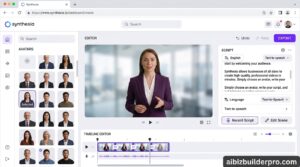
Synthesia pioneered AI avatar video, allowing professionals to create polished talking-head videos without ever appearing on camera. Upload a script, select from 140+ AI avatars or create a custom digital twin of yourself, and Synthesia generates a professional presenter video complete with natural gestures and lip-sync in over 120 languages.
For LinkedIn professionals who struggle with camera confidence or don’t have time for constant filming, Synthesia maintains your video presence at scale. The platform includes pre-designed templates for common B2B use cases like product updates, training videos, and company announcements, dramatically reducing production time.
Best Use Case: Executives creating consistent company updates without filming sessions, L&D teams producing multilingual training content, marketing teams maintaining video content calendars without video production resources.
Pricing: Starter plan at $22/month (annual) with 10 minutes of video, Creator plan at $67/month with custom avatars and longer videos.
Pros: No camera required, 120+ languages with accurate lip-sync, custom avatar creation from just 5 minutes of footage, professional templates accelerate production.
Cons: AI avatars still recognizably synthetic to trained eyes, limited to talking-head format without dynamic B-roll, expensive for high-volume use.
4. HeyGen – Best for Quick AI Avatar Videos with Multilingual Support
HeyGen offers similar AI avatar capabilities to Synthesia but with faster generation times and more affordable pricing for smaller teams. The platform’s avatar library includes diverse, professional-looking presenters, and the video translation feature lets you create one video in English and automatically generate versions in 40+ languages with matching lip movements.
HeyGen’s strength for LinkedIn is speed and simplicity. The interface is intentionally streamlined for quick video creation, making it ideal for professionals who need to publish regular LinkedIn content without extensive video editing knowledge.
Best Use Case: Content creators maintaining consistent LinkedIn posting schedules, international teams creating localized video content, solopreneurs building thought leadership without filming.
Pricing: Free plan with watermark, Creator plan at $24/month with 15 minutes of video, Business plan at $120/month for teams.
Pros: Fast generation times (2-3 minutes per video), intuitive interface for beginners, excellent video translation with lip-sync, affordable entry pricing.
Cons: Limited customization compared to Synthesia, free plan watermark not suitable for professional use, avatar realism slightly below industry leaders.
5. D-ID – Best for Animating Static Photos Into Talking Videos
D-ID takes a different approach by animating any portrait photo into a talking video. Upload a headshot of yourself, a team member, or even a historical figure, add audio or text-to-speech, and D-ID generates realistic facial movements with lip-sync. This flexibility makes it valuable for LinkedIn professionals who want custom presenters without being limited to pre-designed avatar libraries.
The platform’s video translation feature is particularly powerful for LinkedIn’s global audience. Create a video once in your native language, then generate authentic-looking versions in multiple languages without re-filming, dramatically expanding your reach while maintaining personal authenticity.
Best Use Case: Personal brands creating custom avatar videos from professional headshots, agencies producing client-specific presenter videos, educators bringing subject matter experts to video without their direct involvement.
Pricing: Free trial with 3 minutes, Lite at $4.70/month (personal use), Pro at $16/month with commercial license and 1080p export.
Pros: Animate any photo rather than selecting from avatars, impressive lip-sync accuracy, multi-language video translation, affordable Pro pricing.
Cons: Still recognizably AI-generated, limited body movement (facial animation only), front-facing portrait photos work best.
6. Rephrase.ai – Best for Personalized Video Campaigns at Scale
Rephrase.ai specializes in hyper-personalized video creation, allowing businesses to generate thousands of customized videos from a single template. Create one master video with your digital avatar, then automatically generate personalized versions mentioning each recipient’s name, company, or specific pain points.
For LinkedIn outreach campaigns, this personalization dramatically improves response rates. Instead of generic video blasts, prospects receive videos that specifically address them and their business challenges, creating the perception of one-to-one communication while operating at scale.
Best Use Case: Sales teams running personalized LinkedIn outreach campaigns, marketing teams creating customized video ads, customer success teams sending personalized onboarding videos to new clients.
Pricing: Enterprise pricing only (custom quotes based on volume), typically starting around $500/month for high-volume use.
Pros: Massive personalization at scale, custom avatar creation, API integration for automated workflows, proven ROI for sales and marketing teams.
Cons: Enterprise pricing prohibitive for solopreneurs, requires significant volume to justify cost, longer setup time than consumer-focused tools.
7. Waymark – Best for Professional Ad-Style Videos for LinkedIn
Waymark focuses on creating professional advertising-style videos optimized for business promotion. The platform provides templates specifically designed for LinkedIn’s professional audience, including company announcements, product launches, event promotions, and hiring campaigns. AI analyzes your inputs and automatically generates polished videos with motion graphics, transitions, and music.
For businesses using LinkedIn as a primary marketing channel, Waymark bridges the gap between amateur content and expensive agency production. The output quality is high enough for sponsored posts and company page content while remaining affordable and fast enough for consistent publishing.
Best Use Case: Marketing teams creating LinkedIn video ads, companies promoting events and webinars, HR teams creating recruitment videos, agencies producing client content.
Pricing: Custom pricing based on usage, typically $500-1000/month for business plans.
Pros: Professional ad-quality output, templates optimized for business use cases, motion graphics and music included, faster than traditional video production.
Cons: Higher pricing than consumer tools, limited to template-based creation, less flexibility for highly customized content.
Comparison Table: LinkedIn AI Video Tools at a Glance
| Tool | Best For | Starting Price | Key Feature | Ideal User |
|---|---|---|---|---|
| Loom | Screen recordings & async | $12.50/month | Instant sharing with analytics | Sales, support teams |
| Vidyard | Sales video prospecting | $19/month | CRM integrations | B2B sales teams |
| Synthesia | AI avatar presentations | $22/month | 140+ avatars, 120 languages | Executives, L&D teams |
| HeyGen | Quick avatar videos | $24/month | Fast generation, translation | Content creators |
| D-ID | Photo animation | $4.70/month | Animate any portrait | Personal brands |
| Rephrase.ai | Personalized campaigns | $500+/month | Mass personalization | Enterprise sales/marketing |
| Waymark | Professional ads | $500+/month | Ad-quality templates | Marketing teams |
Frequently Asked Questions
What is the best AI tool for LinkedIn thought leadership videos?
Loom is the best choice for authentic thought leadership because it captures your real face and screen, building genuine trust with your audience. While AI avatar tools like Synthesia and HeyGen work for consistent posting, viewers respond better to real people on camera for building personal authority. Loom’s viewer analytics also help you understand which topics resonate most with your professional audience.
Can AI video tools help you get more LinkedIn engagement?
Absolutely. LinkedIn’s algorithm prioritizes native video, giving video posts an average engagement rate of 5.6% compared to 4.0% for text-only content. AI tools make it practical to maintain a consistent video posting schedule without the traditional production overhead, and consistency is key to algorithmic distribution. The combination of increased reach from the algorithm and higher engagement from video format creates compound growth in your LinkedIn presence.
Do AI avatar videos work for B2B sales on LinkedIn?
AI avatar videos work well for certain B2B sales applications, particularly high-volume outreach, multilingual campaigns, and consistent content publishing. However, for high-stakes sales conversations and building deep relationships, mixing AI avatars with real-person video yields better results. Use AI avatars for educational content and broad outreach, then switch to real video for personalized follow-ups and closing conversations.
How much should I spend on AI video tools for LinkedIn?
For solopreneurs and individual professionals, budget $15-30/month for tools like Loom, HeyGen, or D-ID. Small teams (3-10 people) should expect $100-300/month across multiple tools or team licenses. Enterprise sales and marketing teams running personalized campaigns at scale may invest $500-2000/month in tools like Rephrase.ai or Waymark. Start with a single tool’s free trial to validate ROI before expanding your stack.
What video length works best for LinkedIn?
Short videos (30-90 seconds) work best for discovery and reaching new audiences, as LinkedIn’s algorithm favors content that keeps viewers engaged without lengthy time commitments. Longer videos (2-5 minutes) perform well with audiences who already know you and are actively seeking in-depth information. For most B2B professionals, aim for 60-90 second videos that deliver one clear insight or actionable tip, saving longer formats for detailed product demos or educational series.
Final Verdict: Choosing Your LinkedIn AI Video Stack
The right AI video tool for LinkedIn depends entirely on your specific use case and content strategy. Here’s how to choose:
If you’re a sales professional doing personalized outreach: Start with Loom ($12.50/month) for screen recordings and product demos, then add Vidyard for CRM integration and analytics. The combination gives you both quick creation and sophisticated tracking.
If you’re building thought leadership as a consultant or executive: Invest in Synthesia ($22/month) or HeyGen ($24/month) to maintain consistent posting without constant filming. Use AI avatars for regular educational content, but film real videos quarterly for high-impact announcements.
If you’re a content creator or solopreneur on a tight budget: D-ID’s Lite plan ($4.70/month) offers remarkable value for creating talking-head videos from a single professional headshot. Pair it with Loom’s free plan for occasional screen recordings.
If you’re a marketing team scaling LinkedIn video ads: Waymark’s professional templates justify the higher investment by producing ad-quality content without agency fees. For personalized campaigns, Rephrase.ai’s mass customization capabilities drive measurably higher conversion rates.
The most successful LinkedIn video strategies don’t rely on a single tool. Instead, they combine screen recording (Loom or Vidyard) for authentic demos with AI avatars (Synthesia, HeyGen, or D-ID) for consistent content publishing. This hybrid approach balances authenticity with scalability, letting you maintain presence without burning out.
Remember that LinkedIn’s algorithm rewards consistency above perfection. A good video published today beats a perfect video that never ships. Choose tools that reduce friction in your workflow, start with one video per week, and let data guide your evolution. The professionals winning on LinkedIn in 2026 aren’t the ones with Hollywood production budgets – they’re the ones showing up consistently with valuable insights delivered through video.