Pricing verified as of February 2026 — sourced from official pricing pages.
Creating video content shouldn’t require a computer science degree or a Hollywood budget. That’s the philosophy behind Kapwing, a cloud-based video editing platform that’s become the go-to tool for teams at Google, Spotify, and thousands of marketing agencies worldwide. Whether you’re resizing a video for Instagram Stories, adding auto-subtitles to a podcast clip, or collaborating with your team on a product launch video, Kapwing handles it all in your browser—no downloads, no complicated timelines, just results.
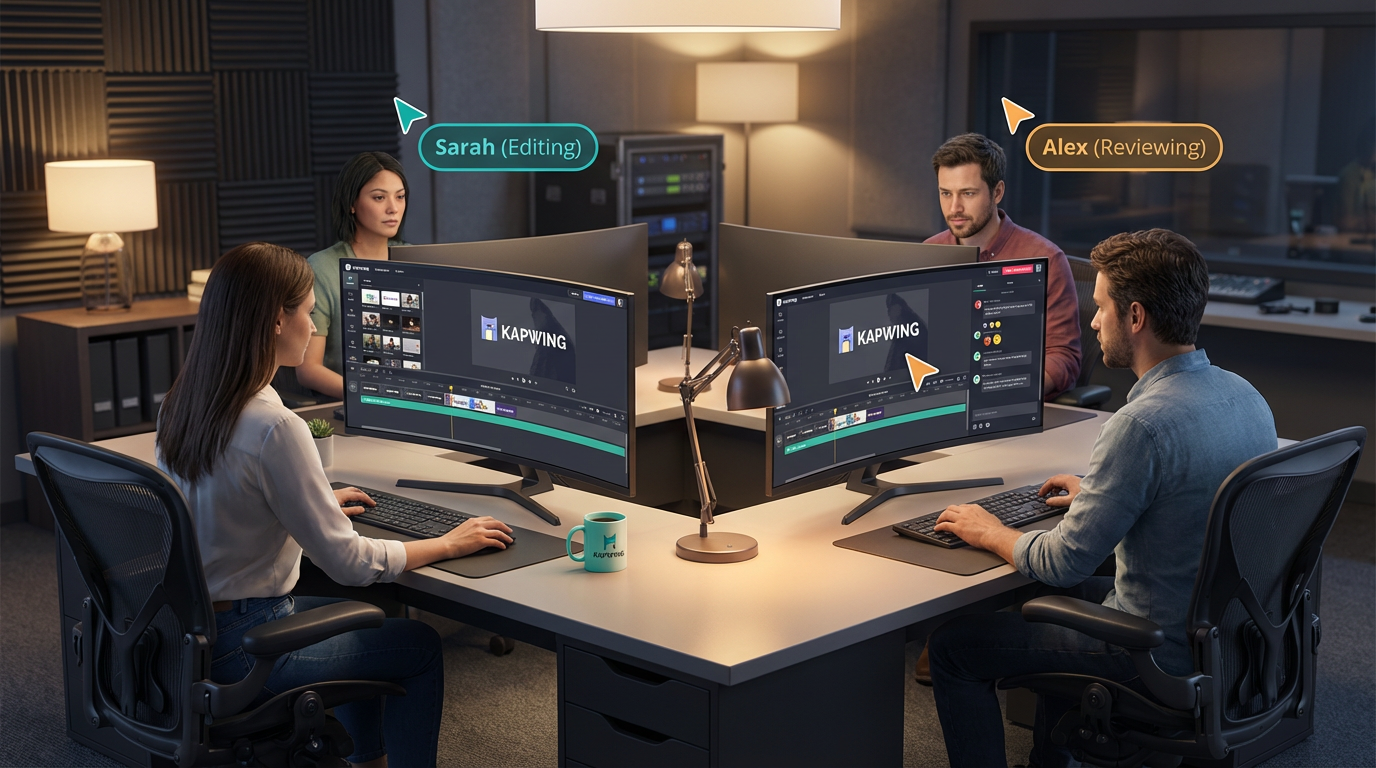
What sets Kapwing apart isn’t just the AI-powered features (though those are impressive). It’s the collaborative workflow. Multiple team members can edit the same project simultaneously, leave timestamped comments directly on the video, and access shared brand kits. For modern content teams juggling tight deadlines and remote work, Kapwing eliminates the back-and-forth chaos of traditional video production.
Why Teams Love Kapwing
Kapwing launched with a simple mission: make video editing as easy as editing a Google Doc. Over the years, they’ve stayed true to that vision while adding powerful AI tools that would’ve seemed futuristic just a couple of years ago.
Here’s what makes Kapwing different from the dozens of other online video editors out there:
Real-time collaboration. This isn’t just “share a link and hope for the best.” Multiple editors can work on the same project at the same time, seeing each other’s changes live. Reviewers can drop comments at specific timestamps, and the whole team can access workspace folders with organized projects. If you’ve ever dealt with the nightmare of “final_version_v3_FINAL_revised.mp4,” you’ll appreciate this.
Workspace-based organization. Kapwing isn’t built for solo hobbyists (though they can use it too). It’s designed for teams. You get shared workspaces, unlimited folders, project version history, and role-based permissions. Everyone works from the same library of brand assets, templates, and stock media.
Credit-based AI features. Instead of locking AI tools behind expensive tiers, Kapwing uses a credit system. Auto-subtitling, dubbing, text-to-speech, and generative AI features all pull from your monthly credit pool. The Pro plan includes 1,000 credits per month (enough for 1,000 minutes of auto-subtitles or 50 minutes of dubbing), and Business users get 4,000 credits. You know exactly what you’re getting, and you can purchase more credits if you run out.
Constant innovation. Kapwing ships new features almost weekly. In January 2026 alone, they released improved workspace features, AI prompt inputs for smarter generation, and faster creation workflows. The platform evolves based on user feedback, which means it’s getting better every month.
Core Features and AI Tools
Auto-Subtitling and Translation
Kapwing’s auto-subtitle tool is fast, accurate, and supports dozens of languages. Upload your video, click “Auto-subtitle,” and you’ll have a full transcript in minutes. The editor lets you adjust timing, fix any errors, and choose from animated subtitle styles that work great on social media. The auto-translate feature extends your reach by converting subtitles into over 60 languages—perfect for global campaigns or multilingual audiences.
Pro users get 1,000 credits monthly, which translates to up to 1,000 minutes of auto-subtitling. Business users get 4,000 credits (4,000 minutes of subtitling). For comparison, that’s enough to subtitle 66+ hours of content per month on the Pro plan.
Smart Cut – Automatic Silence Removal
Smart Cut is a lifesaver for anyone editing talking-head videos or podcasts. It automatically detects and removes silent sections, pauses, and dead air from your footage. What would normally take an hour of manual cutting happens in seconds. You can adjust the sensitivity to keep natural pauses or go aggressive and cut everything. The result is tighter, more engaging content that holds viewers’ attention.
Text-to-Speech and Voice Cloning
Need a voiceover but don’t want to record it yourself? Kapwing’s text-to-speech feature offers natural-sounding voices in multiple languages and accents. Type your script, pick a voice, and the AI generates the audio. Pro users get up to 50 minutes per month, and Business users get 200 minutes.
The Business plan also includes voice cloning, which lets you record a short sample of your own voice and then generate unlimited voiceovers that sound like you. This is a huge time-saver for content creators who need consistent narration across multiple videos.
AI Dubbing with Lip Sync
Kapwing’s dubbing feature goes beyond just translating audio—it actually syncs the translated voiceover to the speaker’s lip movements. Upload a video in English, dub it into Spanish, and the AI adjusts the timing so the audio matches the on-screen speaker. Business users get 200 minutes of dubbing per month, which is more than enough for most localization projects.
Background Removal (Image and Video)
Remove backgrounds from images or videos with one click. No green screen required. The AI identifies the subject and isolates it from the background, giving you a transparent layer you can place over new backgrounds, graphics, or B-roll footage. This works especially well for product videos, talking-head intros, and social media content where you want creative visual layers.
Clean Audio
Clean Audio automatically removes background noise, balances loudness, and reduces popping sounds in your video or audio files. If you’ve ever recorded in a noisy coffee shop or had a microphone that picked up every keyboard click, this tool fixes it instantly. Pro users get up to 500 minutes per month, and Business users get 2,000 minutes.
Resizer and Find Scenes
One video, multiple platforms. Kapwing’s Resizer lets you convert videos between aspect ratios (16:9, 1:1, 9:16, etc.) in seconds. The Find Scenes tool detects scene changes automatically and makes splits, which speeds up the resizing process when you’re working with longer videos. This is essential for teams repurposing content across YouTube, Instagram, TikTok, and LinkedIn.
Edit with AI
Kapwing’s Edit with AI feature uses natural language prompts to make editing decisions. Tell it what you want (“remove all the sections where no one is talking,” “add upbeat background music,” “highlight the speaker’s face”), and the AI handles it. Pro users get up to 30 AI edits per month, and Business users get 130.
Stock Library and Templates
Kapwing offers thousands of copyright-free videos, photos, audio tracks, and GIFs. Free users get a starter set, while paid users get unlimited access to the full library. There are also hundreds of customizable templates for social media posts, ads, intros, outros, and presentations. Instead of starting from scratch, grab a template, swap in your content, and export.
Pricing Breakdown (2026)
Kapwing offers four plans: Free, Pro, Business, and Enterprise. Here’s what each one includes:
Free Plan ($0/month)
- 10 credits per month (up to 10 minutes of auto-subtitles or 2 minutes of text-to-speech)
- Unlimited exports with Kapwing watermark
- Export videos up to 1 minute long
- 720p video quality
- Starter set of stock assets
- 3 saved projects in cloud storage (3-day storage duration)
- Basic editing tools (resizer, transitions, effects, screen recorder)
The Free plan is genuinely useful for light editing, testing the platform, or personal projects where a watermark doesn’t matter. The 1-minute export limit is restrictive, but it’s enough to get a feel for the interface and features.
Pro Plan ($16/month or $192/year)
- 1,000 credits per month (up to 1,000 mins of auto-subtitles, 50 mins of dubbing, 30 AI edits)
- No Kapwing watermark
- Upload files up to 6GB
- Export in 4K resolution
- Export videos up to 2 hours long
- Unlimited monthly video export time
- Unlimited stock videos, photos, audio, and GIFs
- Unlimited cloud storage (projects stored forever)
- Brand Kit with custom fonts and colors
- Collaborative shared workspace
- Real-time collaboration
- Commenting and project link sharing
- Project version history
- Workspace folders (unlimited)
Pro is perfect for solo creators, freelancers, and small teams. At $16/month (billed annually), it’s competitively priced compared to similar tools, and the 1,000 credits give you plenty of room for AI features. The unlimited storage and 4K exports are huge bonuses.
Business Plan ($50/month or $600/year)
- 4,000 credits per month (up to 4,000 mins of auto-subtitles, 200 mins of dubbing, 130 AI edits)
- Everything in Pro, plus:
- Create custom voice clones
- Lip sync videos (AI dubbing with lip matching)
- Ability to purchase additional credits
- Private folders and private projects
- Priority support
Business is built for agencies, marketing teams, and companies producing high volumes of content. The 4,000 credits mean you can auto-subtitle over 66 hours of content per month, and the voice cloning + lip sync features are game-changers for localization and brand consistency.
Enterprise Plan (Custom Pricing)
- Custom credit allocation
- Everything in Business, plus:
- Custom billing (invoices, wire transfers)
- Dedicated account manager
- Priority customer support
- Onboarding and training sessions
- SAML single sign-on (SSO)
Enterprise is designed for large organizations with complex needs, security requirements, and high-volume workflows. Contact Kapwing’s sales team for pricing and custom packages.
Who Should Use Kapwing
Marketing Teams and Agencies
Kapwing is tailor-made for marketing teams. The collaborative workspace means everyone can access the same brand assets, templates, and ongoing projects. Reviewers can leave feedback directly on the video timeline, eliminating endless email threads and Slack messages. The resizer and template library make it easy to produce content for multiple platforms quickly, and the AI tools (auto-subtitles, clean audio, dubbing) save hours on every project.
Social Media Managers
If you’re managing multiple social accounts and publishing daily, Kapwing streamlines the entire workflow. Import content, resize for each platform (TikTok, Instagram Reels, YouTube Shorts, LinkedIn), add auto-subtitles with trendy styles, and batch-export everything. The Smart Cut feature helps you pull tight clips from longer videos, and the Find Scenes tool makes repurposing easy.
Content Creators and YouTubers
Kapwing is popular among creators who want professional results without the complexity of Premiere Pro or Final Cut. The auto-subtitle feature helps with accessibility and engagement, the Clean Audio tool fixes recording issues, and the template library speeds up intro/outro creation. The Pro plan is affordable for creators on a budget, and the 4K export quality means your videos look sharp.
Educators and E-Learning Creators
Teachers and course creators use Kapwing to make lessons more engaging. The auto-subtitle feature improves accessibility, the text-to-speech tool lets you add narration without recording, and the screen recorder is perfect for tutorial videos. The commenting feature is also great for student collaboration projects.
Podcasters
Turn your podcast into video clips for social promotion. Upload your episode, use Smart Cut to remove silences, add animated waveforms or subtitles, and resize for each platform. The auto-subtitle feature ensures viewers can follow along even with the sound off, and the Clips-style editing makes it easy to pull highlight reels.
International and Multilingual Teams
If you’re creating content for global audiences, Kapwing’s translation and dubbing features are invaluable. Auto-translate subtitles into 60+ languages, use AI dubbing to create localized voiceovers, and even apply lip sync to make the dubbed versions look natural. The Business plan gives you enough credits to handle serious localization workflows.
Pros and Cons
Pros
- Real-time collaboration: Multiple team members can edit simultaneously without conflicts
- Credit-based AI system: Pay for what you use, and credits cover multiple AI features
- Generous Pro plan: $16/month with 1,000 credits, 4K exports, and unlimited storage
- Excellent auto-subtitles: Accurate transcription with customizable animated styles
- Smart Cut saves hours: Automatic silence removal tightens pacing instantly
- Templates and stock library: Huge time-saver for social content and ads
- Voice cloning and dubbing: Business plan offers advanced localization tools
- Regular updates: New features and improvements shipped frequently
- Intuitive interface: Easy to learn, even for non-editors
Cons
- Free plan export limit: 1-minute cap is too restrictive for most use cases
- Credits run out fast on heavy use: If you’re subtitling hours of content weekly, you may need to purchase extra credits
- Not for advanced editing: Limited timeline features compared to Premiere Pro or DaVinci Resolve
- Requires internet connection: No offline editing capability
- No free trial for paid plans: You have to commit to a subscription or stick with the limited Free plan
Real-World Use Cases
Agency Creating Multilingual Ad Campaigns
A digital marketing agency needed to create Facebook ads in English, Spanish, and French for a client’s product launch. They filmed one video in English, uploaded it to Kapwing, used auto-subtitles to transcribe it, then auto-translated the subtitles into Spanish and French. They applied AI dubbing to create localized voiceovers with lip sync, resized the video for Instagram Stories and YouTube, and exported all versions in under 2 hours. Total cost: included in their Business plan credits.
Podcast Network Repurposing Episodes
A podcast network publishes 20 episodes per week and needs social clips for each one. They use Kapwing’s Smart Cut to remove silences, Find Scenes to identify topic changes, and auto-subtitles to add captions. Each podcast producer works in their own workspace folder, but the entire team shares the brand kit and template library. They estimate Kapwing saves them 30+ hours per week compared to manual editing.
E-Learning Platform Scaling Content Production
An online education company needed to produce 100+ tutorial videos per month. They use Kapwing’s screen recorder to capture software demos, text-to-speech to add narration, and Clean Audio to fix any microphone issues. The team collaborates in real-time, leaving timestamped comments for revisions. The Pro plan’s unlimited storage means they never have to delete old projects, and the version history lets them roll back changes if needed.
Small Business Creating Product Videos
A small e-commerce brand wanted to create product demo videos for Instagram and TikTok. They used Kapwing templates to speed up production, added background music from the stock library, and resized each video for multiple platforms. The background removal tool let them isolate products and place them over branded backgrounds. They published 12 videos in one afternoon using just the Pro plan.
Tips for Getting the Most Out of Kapwing
Set up your Brand Kit first. Upload your logo, define your brand colors, and add custom fonts. This way, every video you create will automatically match your branding.
Use workspace folders to stay organized. Create folders for different projects, clients, or campaigns. This keeps your workspace clean and makes it easy for team members to find what they need.
Take advantage of templates. Don’t start every project from scratch. Kapwing’s template library covers most use cases—customize one instead of building from zero.
Monitor your credit usage. Check your monthly credit balance in the Billing settings. If you’re running low, consider upgrading to the Business plan or purchasing additional credits.
Use keyboard shortcuts. Kapwing supports shortcuts for common actions (split, trim, duplicate). Learning a few will speed up your editing significantly.
Collaborate with comments. Instead of describing edits in Slack or email, drop comments directly on the video timeline. It’s faster and clearer for everyone involved.
Export in the highest quality you need. If the video is going on Instagram, 1080p is fine. For YouTube or broadcast, export in 4K. Higher quality means larger files, so match the export to the platform.
How Kapwing Compares to Competitors
Compared to VEED.io, Kapwing has stronger collaboration features and workspace organization, while VEED offers more AI video generation models. If you’re working solo and want to experiment with AI-generated clips, VEED might have the edge. If you’re on a team and need real-time collaboration, Kapwing wins.
Compared to Descript, Kapwing is faster for social content creation and resizing, while Descript is better for long-form podcast editing with its text-based timeline. Descript’s transcription is slightly more accurate, but Kapwing’s credit system gives you more flexibility across AI features.
Compared to Canva Video, Kapwing offers more advanced editing tools and better collaboration. Canva is great for quick social graphics and simple videos, but Kapwing handles more complex projects and offers superior AI features like dubbing and lip sync.
Compared to Adobe Express, Kapwing is more intuitive and faster to learn. Adobe Express integrates tightly with Creative Cloud, which is great if you’re already in that ecosystem, but Kapwing’s standalone platform is easier for teams that don’t use Adobe products.
Bottom Line: Is Kapwing Worth It?
If you’re part of a content team, marketing agency, or you’re managing multiple video projects at once, Kapwing is one of the best investments you can make. The real-time collaboration eliminates workflow friction, the AI tools save hours on repetitive tasks, and the credit-based system gives you flexibility to use features as needed.
The Pro plan at $16/month is a steal for what you get—4K exports, unlimited storage, 1,000 monthly credits, and a full suite of AI editing tools. It’s perfect for solo creators, freelancers, and small teams who need professional results without breaking the bank.
The Business plan at $50/month is ideal for agencies and teams with high-volume workflows. The 4,000 credits, voice cloning, and lip-sync dubbing make it worth the upgrade if you’re producing content at scale or working with international audiences.
Kapwing won’t replace Premiere Pro for film editors or complex post-production work, but that’s not what it’s designed for. It’s built for modern content teams who need to move fast, collaborate seamlessly, and publish across multiple platforms. If that’s you, Kapwing delivers exactly what you need—without the bloat, complexity, or price tag of traditional video editing software.







