ByteDance’s Seedance 2.0 is redefining AI video generation with native audio sync, multimodal inputs, and cinematic 1080p output. Here’s everything you need to know—including access limitations and the Hollywood controversy nobody’s talking about.
ByteDance just dropped Seedance 2.0, and it’s making serious waves in the AI video space. Released on February 12, 2026, this isn’t just another incremental update—it’s a complete reimagining of what AI video tools can do.
Think of it as the difference between a smartphone camera and a cinema-grade RED camera. Sure, both take videos, but the level of control, quality, and professional capability? Night and day.
But before we get into what Seedance 2.0 can do, there’s important context you need: international access is currently restricted, the global API rollout has been delayed, and the tool landed in the middle of a firestorm with Hollywood studios that’s still unresolved. We’ll cover all of it.
What Is Seedance 2.0?
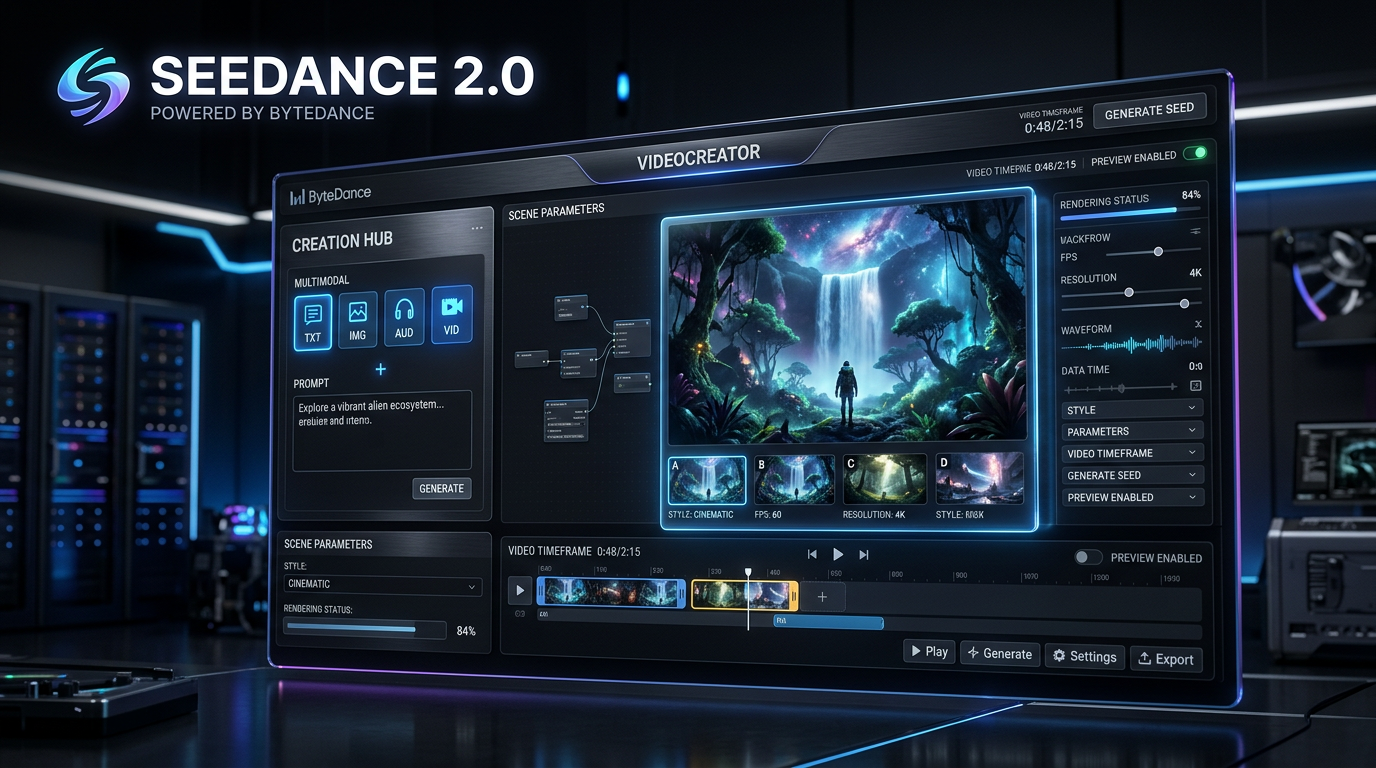
Seedance 2.0 is ByteDance’s latest AI video generation model built on a unified multimodal audio-video joint generation architecture. What that means in practice: you’re not limited to typing a text prompt and hoping for the best. You can feed it images, video clips, audio files, and text descriptions simultaneously.
Specifically, the model supports up to 9 reference images, 3 video clips, and 3 audio files—15 inputs total—all at once. That means you can show the AI exactly what style you want, what motion you’re looking for, and even sync it all to a specific audio track.
The results? Videos that actually look cinematic. We’re talking native 1080p resolution, up to 15 seconds per clip, with character consistency that doesn’t fall apart halfway through. And here’s the kicker—it generates synchronized audio alongside the video using a Dual-Branch Diffusion Transformer architecture, so lip movements and sound effects actually match what’s happening on screen.
What’s New in Seedance 2.0 vs 1.5
If you used the previous version, you’ll immediately notice the difference. Seedance 1.5 Pro was solid for its time—a joint audio-video model focused on complex instruction following. It worked, but it felt more like a production tool with training wheels than a full professional platform.
Seedance 2.0 changes everything.
Resolution and Length
The output has been upgraded to native 1080p cinematic resolution—a meaningful jump in visual clarity and polish. The clip limit has been extended to up to 15 seconds per generation, and you can chain clips together for multi-shot sequences.
Multimodal Control
This is the big one. Previous versions were more limited in what they could accept as reference input. Now you can upload reference images for style, video clips for motion guidance, and audio for synchronization—all combined with your text prompt. The AI actually uses all these inputs together to create something far more coherent than prompt-only generation.
Character Consistency
One of the biggest frustrations with early AI video tools was characters morphing into different people mid-scene. Seedance 2.0 uses advanced techniques to keep characters looking like themselves across shots. If you’re creating a multi-shot narrative, your protagonist won’t suddenly change hairstyles or face shapes between cuts.
Audio-Visual Synchronization
Seedance 2.0 generates audio and video simultaneously in a single pass—not as a post-processing step—with phoneme-level lip-sync in 8+ languages including English, Mandarin, Japanese, Korean, and Spanish. When someone speaks, their mouth movements actually match the words. Sound effects happen when they should. It’s not perfect, but it’s miles ahead of earlier tools.
Motion Quality
The motion has been dramatically improved. Camera movements feel intentional rather than chaotic. Physics looks more natural. Complex multi-character interactions—things like fight choreography or synchronized sports sequences—now render with a coherence that previous models genuinely couldn’t achieve.
Key Features That Actually Matter
Multi-Shot Storytelling
You can create cinematic sequences with multiple connected shots from a single generation. Start with an establishing wide shot, cut to a medium close-up, then a dramatic zoom. Seedance 2.0 maintains visual continuity across these transitions, which is something most AI video tools still struggle with.
The @ Reference System
When crafting your prompt, you use @ symbols to attach reference files. Want your video to match the lighting style of a specific image? @image1 it. Need the camera to move like a particular reference video? @video2 it. This gives you far more creative control than pure text prompts and is one of the genuinely game-changing aspects of this model.
API Access
For developers and businesses, Seedance 2.0 is designed to offer API integration through ByteDance’s Volcengine and BytePlus enterprise platforms. Important caveat: as of early March 2026, the public-facing API launch—originally planned for February 24—has been indefinitely delayed due to the ongoing copyright controversy (more on that below). Enterprise clients can still access via B2B arrangements, but there is no self-serve public API portal available yet.
Advanced Editing Functions
Beyond generation, you get tools like character replacement, scene extension, and video continuation. Made a 15-second clip but want to extend it? You can. Need to swap out a character? That’s possible too—though some reference features have been restricted following the IP controversy.
Professional Output Quality
The videos actually look good. Like, “show it to a client” good. The cinematic quality, color grading, and overall polish are impressive. There’s still an AI “look” if you know what to watch for, but it’s getting harder to spot.
The Hollywood Controversy You Need to Know About
Here’s what most Seedance 2.0 reviews skip over—and it’s arguably the biggest story surrounding this tool.
Within days of launch, Seedance 2.0-generated videos went viral on social media. A hyper-realistic AI clip showing Tom Cruise and Brad Pitt in a rooftop fight—created with a two-sentence prompt—racked up millions of views. Videos recreating Stranger Things, Star Wars, and Spider-Man scenes quickly followed.
Hollywood’s response was swift and severe:
- Disney sent a cease-and-desist letter accusing ByteDance of pre-loading Seedance with what it called “a pirated library” of copyrighted characters from Marvel, Star Wars, and other Disney franchises.
- Paramount Skydance followed with its own letter, citing infringement of South Park, Star Trek, SpongeBob SquarePants, The Godfather, and more.
- Netflix, Warner Bros. Discovery, and Sony Pictures all sent cease-and-desist letters.
- The Motion Picture Association—in its first-ever cease-and-desist to a major AI company—stated that Seedance’s copyright infringement is “a feature, not a bug,” and demanded ByteDance “immediately cease its infringing activity.”
- SAG-AFTRA, the Directors Guild of America, and the Human Artistry Campaign all publicly condemned the platform.
- The Japanese government launched an investigation after anime character deepfakes circulated widely.
ByteDance responded by pledging to strengthen safeguards, and quickly disabled several features: the ability to upload photos of real people as references, the Face-to-Voice cloning feature, and real-person clip generation. The company’s global general counsel, John Rogovin—who spent over a decade as general counsel of Warner Bros.—is handling the situation.
As of early March 2026, no formal lawsuits have been filed, but enforcement is complicated by jurisdictional challenges since ByteDance is headquartered in Beijing.
This isn’t just industry drama. It has direct implications for how you can use the tool—several features have been restricted, the global API rollout is on hold, and the platform’s future availability outside China remains uncertain.
Access: Who Can Actually Use Seedance 2.0 Right Now?
This is where the original hype falls apart for most readers. Seedance 2.0 is not freely or widely available internationally.
Here’s the real access picture as of March 2026:
In mainland China: Fully operational via Jimeng AI and the Doubao app. Requires a Chinese Douyin account, Chinese phone number (+86), and in most cases a Chinese payment method.
Internationally: The situation is more complicated. The Dreamina (CapCut) platform was expected to be the international gateway, but global rollout has been paused. Access is currently limited to members of ByteDance’s invite-only Creative Partner Program. The BytePlus international playground briefly offered free access shortly after launch but was pulled amid the copyright controversy.
API access: The public developer API—originally planned for February 24, 2026—has been delayed indefinitely. BytePlus has confirmed it will launch once copyright protection and deepfake defense mechanisms are refined. No new date has been announced.
Third-party workarounds: Several third-party API platforms briefly offered access but have since removed the model. VPNs alone don’t work—ByteDance’s verification requires an actual Chinese SIM card tied to a Chinese ID.
The bottom line: if you’re outside China and don’t have a Creative Partner Program invite, you’re waiting.
Pricing: What Does It Actually Cost?
Pricing is platform-dependent and in flux, but here’s what’s confirmed:
Jimeng (China): Starts at 69 RMB/month (approximately $9.60 USD). New users can access a 7-day trial for 1 RMB (~$0.14). Seedance 2.0 is a premium feature requiring a paid membership.
Dreamina (International): When available, credit-based plans are expected to range from around $18 to $84/month depending on credit allocation.
API Pricing: When the public API launches, pricing is expected to follow a pay-as-you-go model based on per-minute video generation at different resolution tiers. No official confirmed rate card exists yet.
Compared to hiring videographers or motion graphics artists, the pricing—when you can access it—is extremely competitive. A single 15-second professional video clip could cost hundreds to thousands of dollars to produce traditionally. The catch is that you’ll generate a lot of iterations before landing exactly what you want.
Pros: What Seedance 2.0 Does Exceptionally Well
Cinematic Quality The output genuinely looks professional. Lighting, composition, motion—it all comes together in a way that feels intentional and polished. For B-roll, marketing clips, or social media content, this delivers at a level few AI tools match.
Character Consistency Creating a multi-shot sequence where characters actually look like themselves throughout is a huge win. Earlier tools would give you a different person in every shot.
Multimodal Flexibility The 9-image + 3-video + 3-audio reference system gives you unprecedented creative control. You’re not just describing what you want—you’re showing the AI, at a level of granularity that’s genuinely new.
Audio Synchronization Phoneme-level lip-sync in 8+ languages, generated natively alongside video, is impressive. It’s not flawless, but it’s miles better than manually trying to match audio to AI video.
Motion Stability Camera movements and subject motion feel natural and smooth, even in complex multi-character action sequences. Less of the weird warping and physics-defying chaos you see in lower-quality tools.
Cons: Where Seedance 2.0 Falls Short
Access Restrictions The elephant in the room. If you’re outside mainland China, you’re largely locked out right now. The global rollout is delayed and the timeline is uncertain.
The Copyright Controversy Several of the most powerful features—real-person references, voice cloning—have been restricted or suspended. The regulatory and legal environment around the tool is still evolving.
Steep Learning Curve This isn’t a “type a prompt and go” tool. To get great results, you need to understand the @ reference system, craft effective prompts, and experiment with different combinations. Expect to spend real time learning.
Length Limitations 15 seconds per clip is better than before, but it’s still limiting for longer-form content. Chaining clips maintains continuity reasonably well, but it’s not seamless.
Iteration Requirements You’ll rarely nail it on the first try. Getting exactly what you envision often takes multiple generations with tweaked prompts and references. That burns through credits fast.
It’s Still AI Video Despite the quality improvements, trained eyes can spot the artifacts. Occasional unnatural movements, subtle background inconsistencies—they’re less common but still present.
How to Actually Use Seedance 2.0 (If You Have Access)
Step 1: Get Access If you’re in China, head to Jimeng AI and create an account. International users should sign up for Dreamina at dreamina.capcut.com and request Creative Partner Program access—or wait for the broader public rollout.
Step 2: Choose Your Input Mode Decide whether you’re doing text-to-video, image-to-video, or full multimodal. For best results, go multimodal—combine text prompts with reference images and videos.
Step 3: Craft Your Prompt Be detailed. Include camera angles (“wide-angle establishing shot”), lighting (“golden hour, warm tones”), mood (“melancholic atmosphere”), and subject details (“woman in her 30s, professional attire, confident expression”).
Step 4: Add References with @ Upload reference files using the model’s input system. Specify how each should be used. For example: reference the lighting style from @image1, the camera movement from @video1, sync to audio from @audio1.
Step 5: Generate and Refine First results are rarely perfect. Analyze what worked and what didn’t, then refine your prompt and references. This iterative process is key to getting professional results.
Step 6: Use Advanced Features If your clip needs extension, use video continuation. For multi-shot sequences, generate each shot with consistent references to maintain continuity.
Step 7: Export Once satisfied, export in 1080p. The output is ready for social media, marketing materials, or further editing in traditional video software.
Seedance 2.0 vs The Competition
vs Runway ML Runway is faster and more accessible with a cleaner interface and no geo-restrictions. Seedance 2.0 offers better cinematic quality and more advanced multimodal control when you can access it. If you need quick content now, go Runway. If you need cinematic polish and can navigate the access hurdles, Seedance is worth the effort.
vs Kling AI (Kling 3.0) Kling 3.0 scores slightly higher on speed and value in recent benchmarks. Seedance 2.0 wins on cinematic quality and professional features. Kling is excellent for fast iteration; Seedance is better for final production quality—and Kling is actually available globally right now.
vs Pika Labs Pika is known for ease of use and creative effects. Seedance 2.0 is more technically capable with better character consistency and motion quality. Pika is great for creative experimentation; Seedance is better for professional projects.
vs Hailuo AI Hailuo excels at specific use cases like talking portraits. Seedance 2.0 is more versatile with full-scene generation and multi-shot capabilities.
vs Sora (OpenAI) Sora generates longer clips with impressive quality and is available internationally—including through a licensing deal with Disney, which adds an interesting contrast to the copyright battles Seedance is facing. For international users, Sora is currently the more accessible cinematic-quality option.
vs Veo 3.1 (Google) Veo 3.1 is Google’s answer in the premium AI video space and is available to international users with more predictable access. Seedance 2.0 has a slight edge in audio-visual synchronization according to independent assessments; Veo 3.1 wins on accessibility.
Who Should Use Seedance 2.0?
Content Creators in China (or with CPP Access) If you’re making YouTube videos, TikTok content, or Instagram reels and need high-quality B-roll or establishing shots, Seedance 2.0 is excellent. The cinematic quality elevates your content immediately.
Marketing Teams Need product demos, explainer video clips, or social media ads? When accessible, Seedance can generate professional-looking footage for a fraction of traditional production costs.
Indie Filmmakers The multi-shot storytelling and character consistency make Seedance 2.0 viable for narrative projects, especially for shots that would be difficult or expensive to capture traditionally.
Enterprises and Agencies With API access coming (eventually), agencies will be able to integrate Seedance 2.0 into automated workflows for rapid prototyping and large-scale content generation.
Who Should Wait If you’re an international creator without Creative Partner Program access, right now is the waiting game. Attempting to use unofficial workarounds carries risks around account bans and data privacy. The situation is evolving quickly—a broad public rollout could happen in the coming weeks or months, but there’s no confirmed timeline.
The Real-World Verdict
Seedance 2.0 represents a legitimate leap forward in AI video generation. The multimodal approach is genuinely game-changing: being able to show the AI exactly what you want through layered references—not just describe it—results in outputs that are dramatically more aligned with your creative vision.
Character consistency and motion quality are impressive enough that, in the right contexts, this could realistically be used for client work. The native audio synchronization adds a dimension that makes the videos feel complete rather than silent clips requiring post-production.
But you need realistic expectations on two fronts.
First, technically: this isn’t a point-and-shoot tool. Budget time for experimentation and iteration. Your first dozen attempts probably won’t be great. Once you understand how to craft effective prompts and use the reference system, the quality jumps dramatically—but it takes real learning.
Second, situationally: the copyright controversy is real, access is genuinely restricted for most international users, and the platform is in flux. Seedance 2.0 launched as one of the most capable AI video tools ever built, and immediately collided with Hollywood’s IP enforcement machine. How that plays out will shape what the tool looks like six months from now.
Should You Try It?
If you’re in mainland China or have Creative Partner Program access, absolutely. The quality justifies the investment.
If you’re outside China, the honest answer is: not yet—at least not through official channels. Watch for the Dreamina international rollout. Sign up for the waitlist. And in the meantime, tools like Kling 3.0, Veo 3.1, and Runway are fully accessible and producing excellent results.
Seedance 2.0 isn’t the future of all video production. But it’s definitely part of the future of video production. The question of when that future arrives in your workflow depends a lot on where you live and how the copyright situation resolves.
Final Thoughts
ByteDance has delivered something genuinely impressive with Seedance 2.0. The combination of multimodal inputs, cinematic 1080p quality, character consistency, and native audio-visual synchronization creates a tool that’s legitimately useful for professional work—not just tech demos and experiments.
Is it perfect? No. Is it mired in controversy? Yes. Is it the most technically capable AI video generator released to date? By most measures, yes.
The AI video revolution is happening. Seedance 2.0 is proof that we’re past the “interesting prototype” phase and into the “actually usable tool” era. Whether you can use it right now largely depends on where you are in the world—but it’s worth keeping a close eye on.
Last updated: March 2026. Access status and feature availability are changing rapidly. Check official ByteDance channels for the latest.