Need to add subtitles, translate content, or edit videos without installing software? VEED.io has become one of the most popular browser-based video editors in 2026, attracting everyone from solo creators to Fortune 500 marketing teams. But with pricing changes and AI credit systems causing confusion, is it the right choice for your workflow?
We tested VEED’s latest features extensively, analyzed hundreds of user reviews, and compared it against desktop and mobile alternatives. This comprehensive review reveals what VEED does exceptionally well, where it stumbles, and exactly who benefits most from its browser-based approach.
Visit: https://www.veed.io/
What Is VEED.io? The Browser-Based Video Studio
VEED.io is a web-based video editing platform that runs entirely in your browser—no downloads, no installations, no waiting for updates. Launched with a focus on accessibility features like subtitles and transcription, it has evolved into a comprehensive editing suite with AI-powered tools for captioning, translation, dubbing, and even AI avatar generation.
The platform’s primary appeal is speed and accessibility. Marketing teams can collaborate on projects without expensive software licenses, and creators can edit from any computer with an internet connection. As of early 2026, VEED serves businesses ranging from solopreneurs to companies like P&G, Pinterest, and Visa.
Core Features: What Sets VEED Apart
Industry-Leading Auto Subtitles
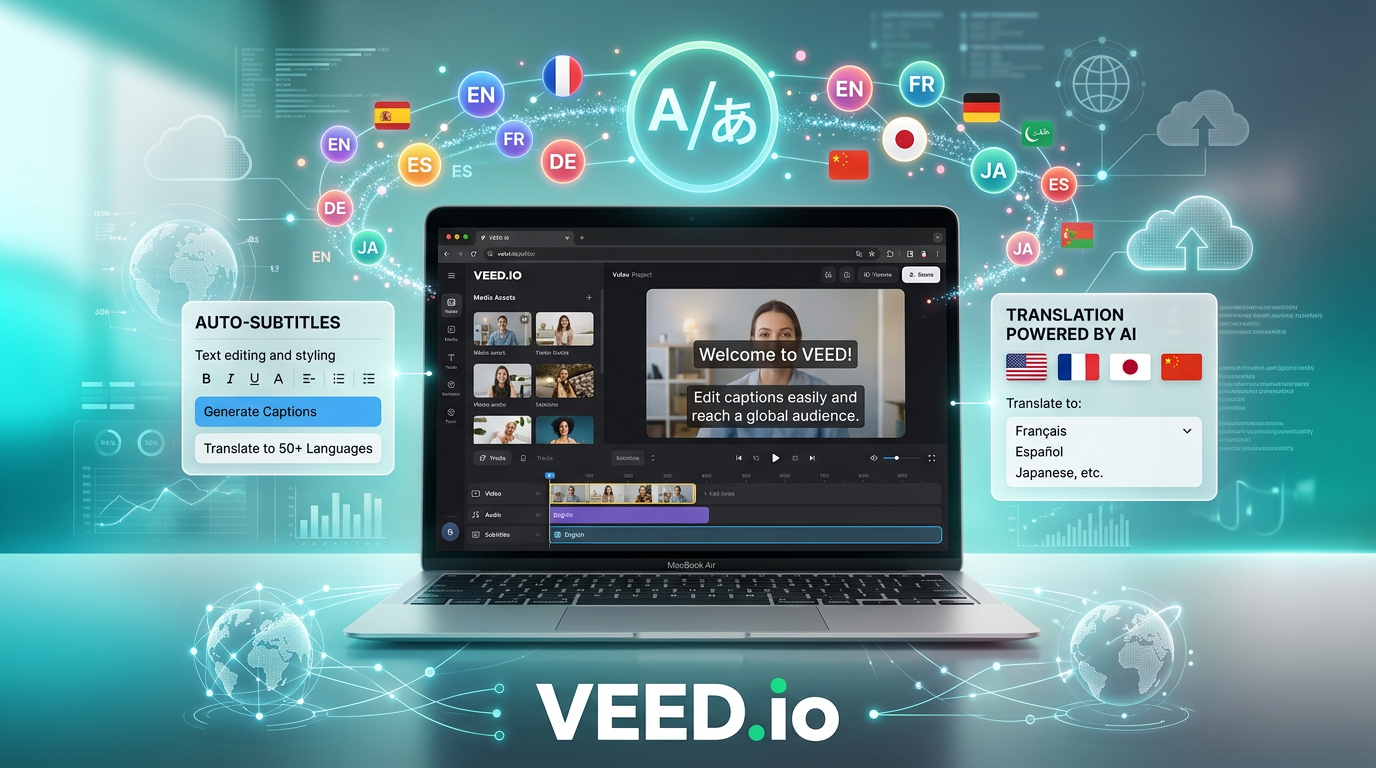
VEED’s subtitle generation is consistently ranked as one of the most accurate in the industry. In our testing, it handled clear speech with near-human accuracy, reducing a task that typically takes hours down to 2-3 minutes. The system supports 125+ languages, making it invaluable for global content strategies.
Real-world impact: A 10-minute video gets timestamped, accurate subtitles in under two minutes. You’ll still need to proofread brand names and technical terms, but the time savings are massive.
Translation and Dubbing
VEED goes beyond simple subtitles with automatic translation and voice dubbing into multiple languages. You can upload a video in English and have it automatically translated to Spanish, French, Hindi, or dozens of other languages—complete with AI-generated voiceovers that match the original tone.
This feature is a game-changer for international brands and creators expanding into new markets. A practical example: a product demo created in English can be localized for five different countries in an afternoon, a process that would traditionally require voice actors, studios, and weeks of coordination.
AI-Powered Editing Tools
VEED’s AI toolkit includes:
- Eye Contact Correction: Makes it appear you’re looking at the camera even when reading from notes
- Background Removal: Clean green-screen-style removal without actual green screens
- Filler Word Removal: Automatically detect and delete “ums,” “ahs,” and repeated words
- AI Avatars: Generate talking-head videos using AI presenters
- Text-to-Speech: Convert written scripts into natural-sounding voiceovers
Collaboration and Team Workflows
The browser-based architecture shines for team projects. Multiple editors can access shared workspaces, apply brand kits (logos, fonts, colors), and provide feedback directly on the timeline. For agencies managing multiple clients, this eliminates the “which version is final?” nightmare.
Pricing Breakdown: Understanding VEED’s Tiers
VEED’s pricing structure has become more complex as AI features expanded:
- Free Plan: Available for short projects with limitations. Good for testing features but not viable for regular production work.
- Basic Plan: Starts at $12/month (or approximately $25/month if billed monthly). Includes core editing, subtitles, and basic AI features. Limited AI credits may restrict heavy usage.
- Pro Plan: Mid-tier plan offering more AI credits, advanced features, and higher export quality.
- Business Plan: Unlocks 4K exports, unlimited AI features, and team collaboration tools. Pricing varies based on team size.
The AI credit confusion: Multiple users report frustration with the credit system. Even on paid plans, certain AI features consume credits that can run out mid-month, forcing either workflow changes or additional purchases. This isn’t always clear upfront, so test your typical workflow on the free plan before committing to an annual subscription.
Competitor Comparison: VEED vs. Alternatives
| Feature | VEED.io | Descript | Kapwing |
|---|---|---|---|
| Platform | Browser-based | Desktop + Web | Browser-based |
| Price (Entry Tier) | $12-25/month | $15/month | $16/month |
| Auto Captions | Excellent (125+ languages) | Excellent (transcript-based) | Very good |
| Best For | Subtitles & translation | Podcast/dialogue editing | Team collaboration |
If you’re working primarily with dialogue-heavy content like podcasts or interviews, Descript’s transcript-based editing workflow may be more efficient. For AI-generated cinematic footage, Runway ML offers superior quality despite longer generation times.
Real-World Performance: Speed and Reliability
In our testing across multiple browsers and devices:
- Upload speed: Fast for files under 2GB; larger files benefit from a stable connection
- Subtitle generation: 10-minute video processed in approximately 90 seconds
- Export stability: Occasional failures reported by users during peak hours; saving projects frequently is recommended
- Browser compatibility: Works best in Chrome and Edge; some users report issues in Firefox and Safari
The browser-based model means your editing experience depends heavily on internet connection quality. A dropped connection mid-export can lose work, so VEED’s auto-save feature is critical—just don’t treat it like desktop software where you can work offline.
Pros & Cons: The Honest Assessment
What We Love ✓
- Best-in-class subtitle generation: Consistently accurate, fast, and supports 125+ languages
- Zero installation required: Edit from any computer without downloads or updates
- Translation and dubbing: Automatic localization for global content strategies
- Team collaboration: Shared workspaces and brand kits streamline agency workflows
- AI avatar generation: Create talking-head videos without filming
What Could Be Better ✗
- Confusing credit system: AI credits can run out on paid plans, causing mid-project friction
- Billing frustrations: Multiple users report issues with subscription management; evaluate carefully before annual commitments
- Internet dependency: Requires stable connection; no offline mode
- Occasional export failures: Reliability issues during high-traffic periods
- Learning curve for advanced features: While basic editing is intuitive, mastering AI tools takes time
Who Should Use VEED.io?
✓ Perfect For:
- Content creators needing fast subtitling for YouTube, TikTok, and Instagram
- Marketing teams localizing content for international audiences
- Agencies without expensive software licenses who need browser-based collaboration
- Educators and trainers creating accessible video content with accurate captions
- Social media managers editing on-the-go from different devices
✗ Not Ideal For:
- Offline editing needs—requires constant internet connection
- Heavy AI users on a budget—credit system can get expensive
- Users with unreliable internet—connection drops can disrupt workflows
- Complex, multi-hour projects—desktop software may be more stable
Use Case Scenarios: VEED in Action
Scenario 1: Global Product Launch
A SaaS company launches a new feature and needs to create announcement videos in English, Spanish, French, German, and Japanese. They film one master video in English, upload to VEED, and use automatic translation and dubbing to create five localized versions. Each version gets accurate subtitles and AI-generated voiceovers matching the original presenter’s tone. Total time: 3 hours vs. weeks of traditional localization.
Scenario 2: YouTube Content Accessibility
A YouTuber with 100K subscribers wants to expand internationally. She uploads her weekly videos to VEED, generates subtitles in 10 languages simultaneously, and exports versions optimized for different regions. The subtitle accuracy reduces manual editing from 45 minutes per video to 5 minutes of proofreading.
Scenario 3: Agency Client Collaboration
A marketing agency manages video content for 8 clients. They create shared workspaces in VEED with each client’s brand kit (logos, colors, fonts). Team members across different cities access projects from their browsers, leave timestamped feedback, and export final versions with one-click brand consistency. No more version control nightmares or “can you send me the latest file?” emails.
Expert Tips for Maximizing VEED.io
- Test your workflow on the free plan: Before committing to an annual subscription, verify the AI credit allocation meets your typical monthly usage
- Proofread auto-generated subtitles: Focus on brand names, technical terminology, and calls-to-action where errors hurt credibility
- Save frequently: Don’t rely solely on auto-save; manually save at major milestones
- Use brand kits for consistency: Set up templates once, apply to all future projects
- Check browser compatibility: Chrome and Edge provide the most stable experience
- Export at off-peak times: If possible, schedule large exports during lower-traffic hours to avoid failures
The Verdict: Is VEED.io Worth It in 2026?
Rating: 4.3/5 ★★★★☆
VEED.io excels as a browser-based video editor with industry-leading subtitle generation and translation capabilities. For content creators, marketing teams, and agencies focused on accessibility and international reach, it delivers genuine value. The ability to edit from any device without installation is liberating, and the auto-caption quality consistently impresses.
The bottom line: If your primary needs are subtitles, translation, and quick social media edits, VEED is one of the best tools available in 2026. The AI credit system and pricing structure require careful evaluation, but for teams already embedded in browser-based workflows, the convenience outweighs the quirks.
However, if you need offline editing, have unreliable internet, or require heavy AI usage on a strict budget, desktop alternatives may serve you better. And if your focus is dialogue-heavy podcast content, Descript’s transcript-first approach might feel more natural.
Our recommendation: Start with VEED’s free plan to test subtitle accuracy and workflow fit. Upgrade to the Basic plan if it saves you significant time, but monitor your AI credit usage for the first month before committing to an annual subscription. For most teams creating accessible, multilingual content in 2026, VEED offers a compelling blend of power and accessibility.