Best AI Video Tools for Faceless Channels in 2026: Go Viral Without Showing Your Face
Building a successful YouTube channel or social media presence no longer requires showing your face on camera. In 2026, AI-powered video creation tools have revolutionized content creation, enabling creators to produce engaging, professional videos without ever appearing on screen. Whether you’re building educational content, commentary channels, explainer videos, or automated social media feeds, faceless video creation offers privacy, scalability, and creative freedom.
The faceless content creation market has exploded, with channels generating millions of views using AI avatars, stock footage, text-to-video tools, and automated voiceovers. This comprehensive guide reviews the 7 best AI video tools specifically optimized for faceless channel creators in 2026, comparing features, pricing, and real-world performance.
Top 7 AI Video Tools for Faceless Channels
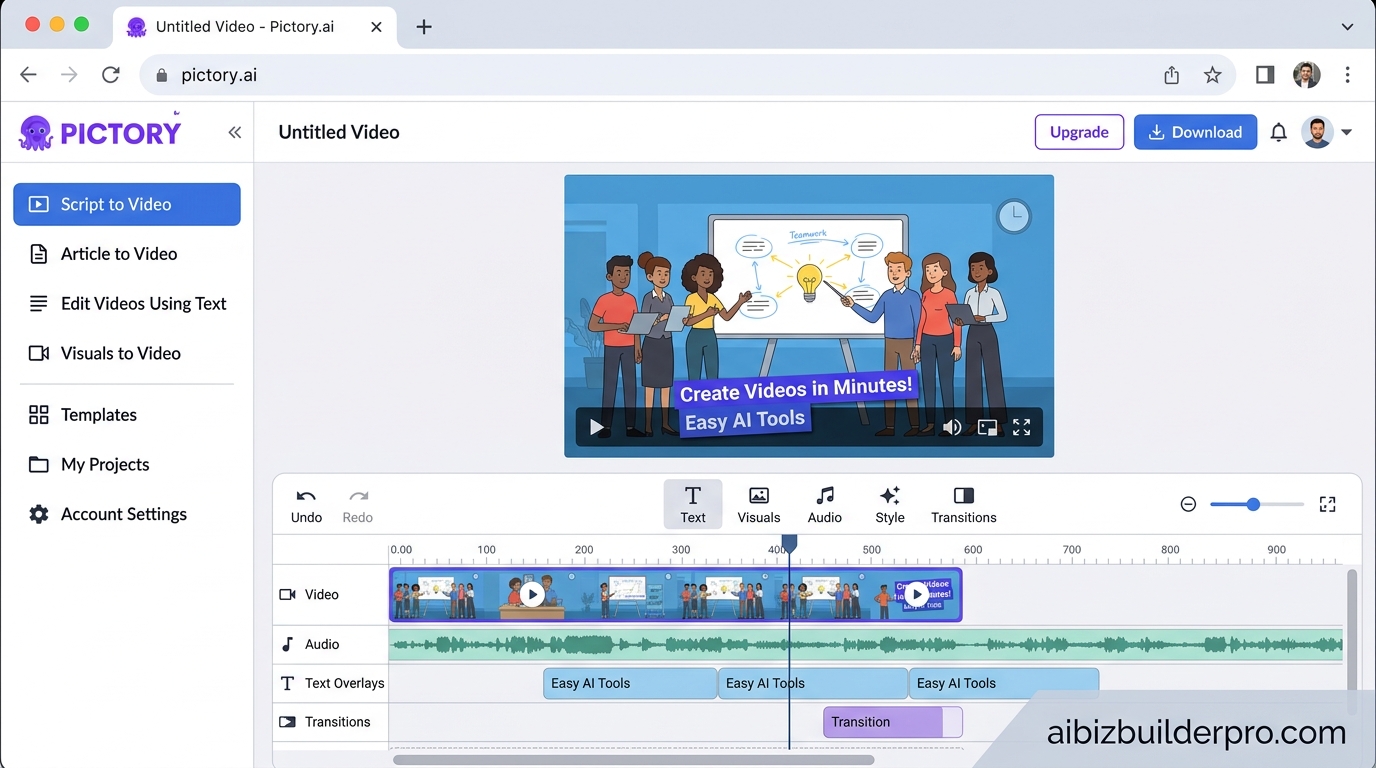
1. Pictory – Best for Script-to-Video Automation
What it is: Pictory is a cloud-based AI video creation platform that transforms written scripts, blog posts, and articles into professional faceless videos using stock footage and AI voiceovers. Visit https://pictory.ai/ to get started.
Best use case: Content repurposing and automated blog-to-video conversion for educational and informational channels.
Key features for faceless creators:
- Script-to-video engine with automatic stock footage selection from 18+ million clips
- Blog URL import – paste any article and auto-generate video scenes
- Text-based editing – modify video by editing the transcript
- 100+ AI voices in 29 languages including hyper-realistic ElevenLabs voices
- Auto-caption generation with 95% accuracy
- Brand kits for consistent branding across videos
- Export in landscape (16:9), portrait (9:16), or square (1:1) formats
Pricing (2026):
- Starter: $25/month – 200 minutes, 720p, 50 AI credits
- Professional: $35/month – 600 minutes, 1080p, 500 AI credits, ElevenLabs voices
- Team: $119/month – 1,800 minutes, 2,400 credits/user, team collaboration
- Free trial: 14 days with 3 projects (no credit card required)
Pros:
- Fastest workflow from script to finished video (5-10 minutes)
- Massive stock library eliminates need for custom footage
- Text-based editing is intuitive for non-video editors
- Excellent auto-captioning for accessibility and social media
Cons:
- Limited creative control over exact clip selection
- AI voices can sound robotic at faster speeds
- No generative AI video – only stock footage assembly
- Starter plan limited to 720p resolution
Read our full Pictory AI Review 2026 for hands-on testing results.
2. InVideo AI – Best for Prompt-to-Video Generation
What it is: InVideo AI is an advanced AI video platform featuring OpenAI’s Sora 2 and Google’s VEO 3.1 models, enabling creators to generate complete videos from text prompts. Visit https://invideo.io/ to explore the platform.
Best use case: Rapid video production for social media, marketing content, and automated content channels requiring photorealistic AI-generated footage.
Key features for faceless creators:
- Sora 2 and VEO 3.1 integration for cinema-quality AI video generation
- AI Twins v4.0 – create hyper-realistic digital avatars (50+ languages)
- Magic Box – natural language video editing commands
- 16 million+ stock assets from iStock and Storyblocks
- Script-to-video automation with AI scriptwriting
- 50+ language support with AI voiceovers and auto-subtitles
- API access for workflow automation
Pricing (2026):
- Free: 10 minutes/week, 4 exports/week, watermarked, 4K exports
- Plus: $20-28/month – 50-60 minutes monthly, 1080p HD, no watermark, commercial rights
- Max: $48-50/month – 200 minutes monthly, 4K exports, priority rendering, 5 voice clones
- Enterprise: Custom pricing for unlimited generation
Pros:
- Cutting-edge AI video generation rivals traditional filming
- Prompt-based creation requires minimal video editing skills
- Character consistency across scenes (VEO 3.1)
- Comprehensive stock library + generative AI flexibility
Cons:
- Premium AI models consume credits quickly
- Learning curve for advanced features
- Free tier heavily watermarked
- Rendering times can be slow during peak hours
Explore our detailed InVideo AI Review for pricing breakdowns and workflow examples.
3. Synthesia – Best for AI Avatar Presenters
What it is:Synthesia specializes in AI avatar video creation, offering 230+ realistic digital presenters who deliver scripts in 140+ languages without requiring filming or actors. Visithttps://www.synthesia.io/to create your first AI avatar video. This is why best ai video tools for faceless channels in 2026 stands out in the market.
Best use case: Training videos, educational content, corporate communications, and explainer videos requiring a professional presenter without on-camera talent.
Key features for faceless creators:
- 230+ stock AI avatars with diverse ethnicities and styles
- Custom avatar creation from your own footage or photos (~$1,000/year)
- 1,200+ AI voices across 140+ languages
- Screen recording and PowerPoint integration
- Brand kits and custom templates
- Collaboration tools for team workflows
- API access for automation
Pricing (2026):
- Free trial: 14 days with 3 minutes of video (no credit card)
- Starter: $22/month – 10 minutes/month, 230+ avatars, 1,200 credits
- Creator: $67/month – 30 minutes/month, custom avatars, brand kits
- Enterprise: Custom pricing – unlimited videos, API access, dedicated support
Pros:
- Most realistic AI avatars on the market
- Massive language support ideal for global audiences
- Professional appearance suitable for corporate use
- Custom avatars enable unique branding
Cons:
- Limited creative editing compared to traditional video tools
- Custom avatars require significant additional investment
- Video minute limits restrictive for high-volume creators
- Stock avatars widely used – less uniqueness
Check out our comprehensive Synthesia Review for avatar quality comparisons.
4. HeyGen – Best for Video Translation & Multilingual Content
What it is: HeyGen is an AI video platform featuring advanced avatar technology (Avatar IV), video translation with lip-sync across 175+ languages, and the new Video Agent 2.0 for prompt-to-video creation. Visit https://www.heygen.com/ to start creating.
Best use case: Multilingual faceless channels, international marketing, and creators needing advanced video translation with realistic lip-syncing.
Key features for faceless creators:
- Avatar IV Engine – latest generation realistic AI avatars
- Video Agent 2.0 – AI prompt-to-video with automated scripting and editing
- Video translation with lip-sync in 175+ languages
- 700+ stock avatars with diverse styles
- Voice cloning and customization
- Instant avatar creation from 15-second webcam recording
- B-roll integration from Sora 2 and Veo 3.1 libraries
- 4K export on Business plan
Pricing (2026):
- Free: 3 videos/month (3 minutes each), 720p with watermark
- Creator: $29/month ($24 annually) – unlimited videos, 1080p, 30-minute max, 200 Premium Credits, voice cloning
- Business: $149/month + $20/seat – 4K export, 5 custom avatars, 1000 Premium Credits, collaboration tools
- Enterprise: Custom pricing – unlimited duration, priority processing, API access
Pros:
- Best-in-class video translation maintains natural lip movements
- Avatar IV delivers exceptional realism
- Video Agent streamlines entire creation workflow
- Voice cloning creates consistent brand voice
Cons:
- Premium Credits system can be confusing
- Advanced features (Avatar IV, lip-sync translation) consume credits quickly
- Business plan expensive for solo creators
- Free plan too limited for serious production
Read our in-depth HeyGen Review for Avatar IV quality testing.
5. D-ID – Best Budget Option for AI Avatars
What it is: D-ID is an affordable AI avatar video platform offering realistic digital presenters, voice cloning, and video translation at entry-level pricing starting at $5.90/month. Visit https://www.d-id.com/ to try it free.
Best use case: Budget-conscious creators, startups, and educators needing AI avatar videos without enterprise pricing.
Key features for faceless creators:
- 100+ stock AI avatars
- Custom personal avatar creation (1-5 depending on plan)
- Voice cloning (1-3 custom voices depending on plan)
- Video Translate in 30+ languages
- Emotion and expression controls for avatars
- API access (all plans)
- Canva integration and PowerPoint add-in
- Mobile app access
Pricing (2026): . For more insights, see our Waymark AI Video Tool Review 2026: Script-to-TV-Ad in Minutes.
- Free trial: 14 days with 3 minutes (no credit card)
- Lite: $5.90/month (annual) – 10 minutes/month, 1 personal avatar, D-ID watermark, no commercial use
- Pro: $29/month (annual) – 15 minutes/month, 3 avatars, 1 voice clone, commercial license
- Advanced: $196/month (annual) – 100 minutes/month, 5 avatars, 3 voice clones, custom watermark removal
- Enterprise: Custom pricing – unlimited minutes, professional voice cloning, SOC 2/HIPAA compliance
Pros:
- Cheapest entry point at $5.90/month
- API access included on all plans
- Canva and PowerPoint integrations streamline workflow
- Good avatar quality for the price
Cons:
- Limited monthly minutes even on paid plans
- Lite plan includes D-ID watermark and no commercial rights
- Avatar realism slightly behind Synthesia and HeyGen
- No minute rollover between months
See our complete D-ID Review for budget comparison analysis.
6. Lumen5 – Best for Social Media Repurposing
What it is: Lumen5 is an AI-powered video creation platform designed specifically for converting blog content and articles into engaging social media videos using automated scene generation and stock media. Visit https://lumen5.com/ to start creating.
Best use case: Social media managers and content marketers repurposing existing blog content into short-form faceless videos for LinkedIn, Instagram, and YouTube.
Key features for faceless creators:
- Blog-to-video conversion with automatic scene creation
- AI script composition assistance
- Extensive stock library (images, videos, music)
- Brand kits and custom templates
- Getty Images integration (Starter plan and above)
- Social media format optimization (LinkedIn, YouTube, Instagram)
- Team collaboration features
- Performance analytics and tracking
Pricing (2026):
- Free: 5 videos/month, 720p, Lumen5 branding, basic templates
- Basic: $29/month – unlimited videos, 1080p, no watermark
- Starter: $79/month ($59 annually) – brand kits, custom templates, Getty Images access
- Professional: $199/month – advanced branding, collaboration, analytics, custom integrations
- Enterprise: Custom pricing – advanced features and support
Pros:
- Excellent for repurposing existing written content
- Intuitive interface designed for non-video editors
- Social media optimization built-in
- Getty Images access provides premium stock footage
Cons:
- Limited creative flexibility compared to full video editors
- AI scene selection sometimes mismatches content context
- No free trial in 2026 (only limited free plan)
- Professional plan expensive for solo creators
Explore our detailed Lumen5 Review for social media workflow examples.
7. Fliki – Best for Voice Cloning & Multilingual Voiceovers
What it is: Fliki is a comprehensive text-to-video platform featuring 2,000+ AI voices across 75+ languages, voice cloning capabilities, and AI avatar integration for faceless content creation. Visit https://fliki.ai/ to explore voice options.
Best use case: Multilingual faceless channels, podcast repurposing, and creators prioritizing high-quality voiceover variety and customization.
Key features for faceless creators:
- 2,000+ AI voices including 1,000+ ultra-realistic and 350+ studio-quality
- Voice cloning (1-3 custom voices depending on plan)
- 70+ AI avatars with customizable options
- Blog-to-video with URL extraction
- AI image generation
- One-click video translation to 80+ languages
- Millions of stock images, video clips, and music tracks
- Auto editing and silence removal
- Screen recording with captions
- YouTube publishing integration
Pricing (2026):
- Free: 5 credits (minutes)/month, 720p with watermark, 300 voices, no commercial rights
- Standard: $28/month ($21 annually) – 180 minutes/year, 1080p, 1000 voices, 1 voice clone, commercial rights
- Premium: $88/month ($66 annually) – 600 minutes/year, 2000+ voices, 3 voice clones, all AI avatars, AI video clips
- Enterprise: Custom pricing – API access, personalized avatars, professional voice cloning, team collaboration
Pros:
- Largest voice library with exceptional variety
- Voice cloning creates unique brand identity
- Comprehensive multilingual support (75+ languages)
- Affordable annual pricing ($21/month Standard)
Cons:
- Uses only stock footage (no AI-generated video scenes)
- Auto-selected media can lack contextual accuracy
- AI avatar lip-sync quality behind Synthesia/HeyGen
- Monthly billing significantly more expensive than annual
Read our full Fliki AI Review for voice cloning quality analysis.
Comparison Table: Best AI Video Tools for Faceless Channels
| Tool | Best For | Starting Price | Key Strength | Main Limitation | Voice Options | Output Quality |
|---|---|---|---|---|---|---|
| Pictory | Script-to-video automation | $25/month | 18M+ stock clips, fastest workflow | No generative AI video | 100+ (29 languages) | 720p-1080p |
| InVideo AI | AI video generation | Free (limited) | Sora 2 & VEO 3.1 integration | Credits consume quickly | 50+ languages | 720p-4K |
| Synthesia | AI avatar presenters | $22/month | 230+ realistic avatars, 140+ languages | Minute limits restrictive | 1,200+ voices | 720p-1080p |
| HeyGen | Video translation & multilingual | Free (limited) | Lip-sync translation in 175+ languages | Premium Credits confusing | 700+ avatars | 720p-4K |
| D-ID | Budget AI avatars | $5.90/month | Cheapest entry point, API access | Limited monthly minutes | 100+ avatars, voice cloning | 720p-1080p |
| Lumen5 | Social media repurposing | Free (limited) | Blog-to-video, Getty Images | Limited creative flexibility | Stock music library | 720p-1080p |
| Fliki | Voice cloning & multilingual | Free (limited) | 2,000+ voices, 75+ languages | Stock footage only | 2,000+ voices | 720p-1080p |
Frequently Asked Questions (FAQ)
1. What are faceless YouTube channels and why are they popular in 2026?
Faceless YouTube channels are content channels where the creator never appears on camera. Instead, they use AI avatars, stock footage, screen recordings, animations, or text-to-video tools to deliver content. They’re popular because they offer complete privacy, eliminate camera anxiety, enable scalable content production through automation, and reduce production costs by removing the need for filming equipment, lighting, and on-camera talent. In 2026, AI tools have made faceless content creation so sophisticated that many top-performing channels generate millions of views without ever showing a real person.
2. Can I monetize faceless YouTube channels created with AI video tools?
Yes, faceless channels created with AI tools can be monetized through YouTube Partner Program, sponsorships, and affiliate marketing, provided you use tools with commercial licenses. Most paid plans (Pictory Professional, InVideo Plus, Synthesia Creator, HeyGen Creator, D-ID Pro, Lumen5 Basic, and Fliki Standard) include commercial rights. Free plans typically prohibit commercial use. Ensure your content is original, adds value, and complies with YouTube’s monetization policies. Channels using only stock footage should add substantial commentary, analysis, or educational value to meet originality requirements.
3. Which AI video tool is best for beginners creating faceless content?
Pictory and Lumen5 are the most beginner-friendly options. Pictory’s text-based editing interface requires no video editing experience – simply paste your script or blog URL, and it auto-generates scenes with stock footage. The workflow takes 5-10 minutes from script to finished video. Lumen5 offers a similar blog-to-video conversion with an intuitive drag-and-drop interface. For those wanting AI avatars, D-ID offers the lowest entry price at $5.90/month, making it ideal for beginners testing faceless avatar content before investing in premium tools like Synthesia or HeyGen.
4. How do I make faceless videos stand out and go viral?
To make faceless videos viral-worthy: (1) Focus on high-value niches like finance, technology tutorials, productivity, or mystery/storytelling content that don’t require on-camera presence. (2) Invest in premium AI voices (ElevenLabs via Pictory Professional, or Fliki’s studio-quality voices) to sound professional and engaging. (3) Use dynamic visuals – mix AI avatars, stock footage, screen recordings, and text animations to maintain visual interest. (4) Master thumbnail design and titles using proven viral formulas. (5) Optimize for watch time by hooking viewers in the first 5 seconds. (6) Add custom branding (logos, color schemes, intro/outro sequences) to build channel recognition. (7) Publish consistently – automation tools enable daily uploads, which YouTube’s algorithm rewards.
5. What’s the difference between stock footage tools (Pictory, Lumen5) and AI avatar tools (Synthesia, HeyGen, D-ID)?
Stock footage tools (Pictory, Lumen5, Fliki) assemble videos from pre-existing images and video clips based on your script’s keywords. They’re ideal for educational content, news commentary, listicles, and how-to videos where diverse visuals enhance the narrative. AI avatar tools (Synthesia, HeyGen, D-ID) generate realistic digital presenters who deliver your script directly to the camera. They’re best for training videos, course content, professional presentations, and content requiring a human-like presenter without hiring actors. InVideo AI bridges both categories by offering stock footage assembly AND generative AI video creation with Sora 2/VEO 3.1, plus AI avatars through AI Twins v4.0, making it the most versatile but also the most complex option.
Final Verdict: Which AI Video Tool Should You Choose?
The best AI video tool for faceless channels depends on your content type, budget, and production volume:
Choose Pictory if you’re repurposing blog content or need fast script-to-video automation with minimal editing. The $35/month Professional plan delivers excellent value with 600 minutes, 1080p exports, and ElevenLabs voices.
Choose InVideo AI if you want cutting-edge generative AI video using Sora 2 and VEO 3.1, or need maximum creative flexibility. The $48/month Max plan provides 200 minutes of premium AI video generation with 4K exports.
Choose Synthesia if you need the most realistic AI avatar presenters for professional or corporate content. The $67/month Creator plan includes custom avatars and brand kits for unique channel identity.
Choose HeyGen if you’re creating multilingual content or need advanced video translation with lip-sync. The $29/month Creator plan offers exceptional value for international audiences.
Choose D-ID if you’re on a tight budget and testing faceless avatar content. The $29/month Pro plan provides commercial rights and voice cloning at the lowest price point among avatar tools.
Choose Lumen5 if you’re primarily creating social media content and repurposing existing blog articles. The $79/month Starter plan includes Getty Images access for premium stock footage.
Choose Flikiif voice quality and variety are your top priority, or you need extensive multilingual support. The $66/month Premium annual plan delivers 600 minutes with 2,000+ voices and unlimited AI avatars. For more insights, see ourBest AI Video Tools for Product Demos in 2026: Showcase, Convert & Sell More. For more insights, see our Best AI Video Tools for Product Demos in 2026: Showcase, Convert & Sell More.
For most faceless channel creators in 2026, we recommend starting with Pictory Professional ($35/month) for educational and informational content, or HeyGen Creator ($29/month) for avatar-based content. Both offer excellent quality-to-price ratios, professional output, and the features needed to build a successful faceless channel that can scale to thousands of subscribers and monetization eligibility.
The faceless content creation revolution is here. With these AI tools, you can build a thriving YouTube channel, TikTok presence, or Instagram following without ever stepping in front of a camera – while maintaining complete privacy and creative control.







