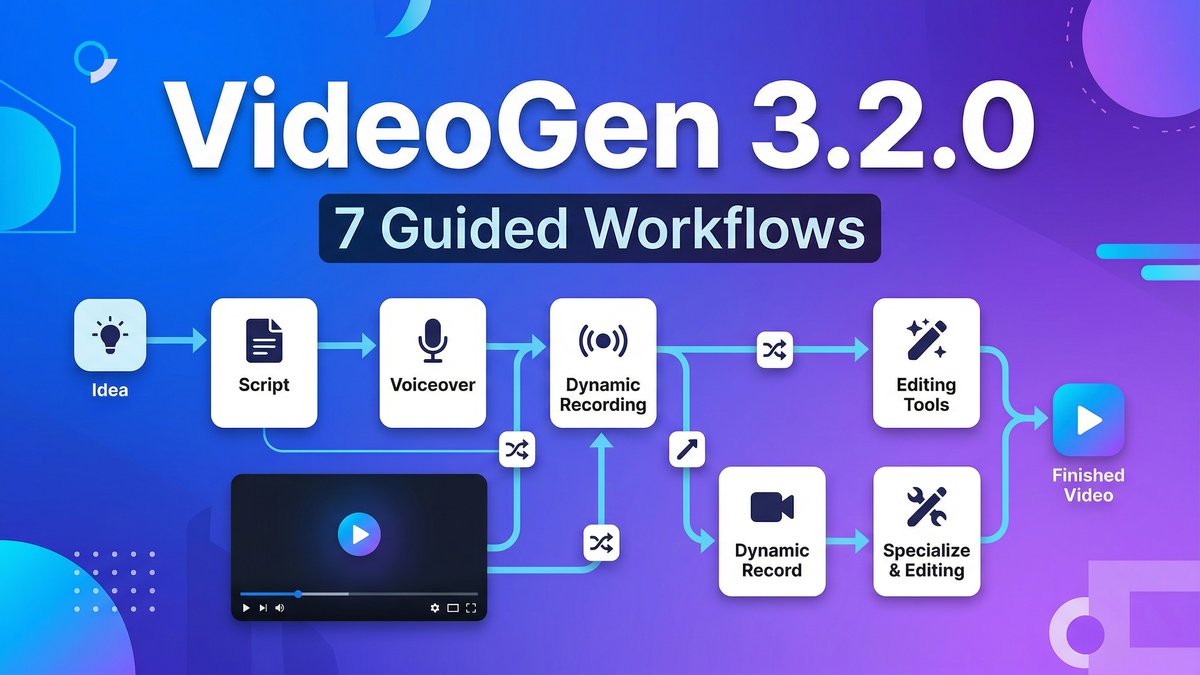
What if creating a professional video didn’t require staring at a blank timeline, wondering where to start? VideoGen 3.2.0 introduces 7 guided workflows that take you from idea, script, voiceover, or recording straight to a polished video—automatically. This is AI video editing for people who hate editing.
Visit https://videogen.io/ to stop editing and start creating.
What Makes VideoGen 3.2.0 Different?
VideoGen has been trusted by over 5 million professionals at companies like Google, Salesforce, Airbus, and Amazon. The 3.2.0 update focuses on one core problem: most AI video tools make you assemble content manually. VideoGen’s guided workflows automate the entire first draft, then let you refine inside the same editor.
The standout feature? 7 Guided Workflows for Automated First Drafts. Choose your starting point—idea, script, voiceover, recording, or existing assets—and VideoGen generates a complete first draft automatically. No manual timeline assembly. No hunting for stock footage. Just instant structure you can refine.
Core Features That Save Hours
7 Guided Workflows
Each workflow is optimized for different starting points:
- Idea to Video: Describe what you want, VideoGen writes the script and builds the video
- Script to Video: Paste your script, get instant video with matching visuals
- Voiceover to Video: Upload audio, VideoGen syncs visuals automatically
- Recording to Video: Import screen recordings or footage, get automatic editing
- URL to Video: Convert blog posts or web pages into video content
- Assets to Video: Upload images/clips, VideoGen arranges them into sequences
- Blank Canvas: Start from scratch with full manual control
Media style presets (Free stock, AI image, Premium iStock) help shape creative direction without complexity.
Rebuilt Editor for Performance
Version 3.2.0 rebuilt the editor to reduce lag and improve responsiveness, especially on longer timelines. Mobile playback support means previews work on any device. These aren’t flashy features—they’re the boring infrastructure that makes the tool actually usable.
Advanced Text Editing
Faster inline text editing with bold, italics, and bullet support. Four text animation modes: all-at-once, line-by-line, word-by-word, and character-by-character. Animation duration slider for precise control. Perfect for tutorials, explainers, and social media captions.
Annotation Tools
New line and arrow annotations, duplicate section, and box select tools speed up common tasks. Especially useful for tutorial creators and demo videos where you need to highlight UI elements or draw attention to specific areas. This is why videogen 3.2.0 stands out in the market.
200+ AI Voices, 50+ Languages
The voiceover engine delivers 200+ AI voices across 50+ languages. One-click translation and localization means you can create in English and spin out Spanish or French versions without re-recording.
3 Million+ Copyright-Free Assets
Massive library of stock footage and images, all royalty-free and safe for commercial use. Business plan users get 50 iStock downloads per month for higher-quality visuals.
VideoGen Pricing Breakdown
| Plan | Price (Monthly) | Price (Yearly) | Storage | Key Features |
|---|---|---|---|---|
| Free | $0 | $0 | Limited | Test workflows, limited exports |
| Pro | $24/mo | $12/mo ($144/year) | 50 GB | Unlimited exports, generative AI images, Pro workflows, commercial use |
| Business | $148/mo | $74/mo ($888/year) | 500 GB | All Pro features + AI avatars, generative AI video clips, 50 iStock downloads/month, priority AI access |
| Enterprise | Custom | Custom | Custom | All Business features + dedicated account manager, priority support, custom workflows |
Yearly billing saves 50% compared to monthly. At $12/month for Pro (yearly), VideoGen is genuinely competitive for unlimited video exports with commercial rights.
Coupon alert: Use code HERES30 at checkout for 30% off. Multiple users confirm it works through 2026 and stacks with yearly discounts.
Real cost comparison: Traditional video production: $100-$1,000+ per minute. VideoGen Pro at $12/month with unlimited exports brings average cost per video under $1. That’s a 99%+ cost reduction for high-volume creators.
Pros and Cons
Pros:
- Fastest idea-to-video workflow: 7 guided workflows eliminate manual assembly
- Genuinely affordable: $12/month (yearly) for unlimited exports is hard to beat
- Beginner-friendly interface: No video editing experience required
- High-quality AI voices: 200+ voices sound natural, not robotic
- Massive asset library: 3M+ copyright-free stock footage and images
- Browser-based: No software installation, works anywhere
- Team collaboration built-in: Shared workspaces and centralized billing
- Commercial use rights: Safe for client work and monetization
- Free tier available: Test before committing
Cons:
- AI-selected visuals sometimes miss: Algorithmic B-roll can feel repetitive or off-topic for niche content
- Limited creative control: Not built for frame-level precision or advanced color grading
- Refund policy restrictions: Some users report frustration with annual subscription refunds
- Not for cinematic projects: Built for speed and volume, not Hollywood-quality productions
- Generative AI video quality: Still early days for AI clip generation (Business plan feature)
VideoGen vs. Competitors
| Feature | VideoGen 3.2.0 | Descript | Pictory | InVideo AI |
|---|---|---|---|---|
| Guided Workflows | 7 automated workflows | Audio-first editing | Script-to-video focus | AI content generation |
| AI Voices | 200+ voices, 50+ languages | Overdub (voice cloning) | AI voiceover | AI voiceover |
| Stock Library | 3M+ assets + iStock (Business) | Limited built-in | Extensive stock library | Stock footage included |
| Pro Plan Price | $12/mo (yearly) | $24/mo (yearly) | $23/mo (yearly) | $20/mo (yearly) |
| Video Exports | Unlimited | Unlimited | 30 videos/mo | 50 videos/mo |
| Best For | Fast workflow automation | Podcast/audio editing | Marketing explainers | Content repurposing |
Verdict: VideoGen wins on workflow automation and unlimited exports at the lowest price. Descript is better for audio-first editing. Pictory excels at script-to-video marketing content. InVideo AI offers more AI content generation features. Choose VideoGen when speed and volume matter more than specialized features.
Real-World Use Cases
1. Social Media Content at Scale
Creators cranking out daily YouTube videos, Reels, or TikToks benefit most. The guided workflows mean you can produce 10 videos per week without burning out on editing.
2. Marketing Explainer Videos
Marketing teams needing fast, on-brand explainer videos without production budgets. The Script-to-Video workflow is perfect for converting blog posts into video ads. This is why videogen 3.2.0 stands out in the market.
3. Course Content Creation
Educators building course libraries can use the Recording-to-Video workflow to automatically edit lectures with captions, animations, and visual aids. . For more insights, see our Waymark AI Video Tool Review 2026: Script-to-TV-Ad in Minutes.
4. Product Demonstrations
Small businesses showing products can use the Idea-to-Video workflow to quickly generate professional-looking demos without hiring video editors.
5. Multilingual Content
Global teams needing localized video content in multiple languages. Create once in English, use one-click translation for Spanish, French, German versions.
Expert Tips for VideoGen Success
Tip 1: Choose the Right Workflow for Your Starting Point
Don’t default to “Idea to Video” every time. If you have a polished script, use “Script to Video” for better results. If you have footage, start with “Recording to Video.” Matching your workflow to your starting materials produces better outputs faster.
Tip 2: Leverage Free Trial Before Committing
Use the free tier to test whether VideoGen’s AI-selected visuals work for your content type. Niche technical content sometimes gets generic B-roll. Test with your actual scripts before buying annual plans.
Tip 3: Use Yearly Billing + HERES30 Coupon
Stack the 50% yearly discount with the HERES30 coupon code for maximum savings. That’s $12/month base price minus 30%, bringing effective cost to around $8.40/month for unlimited professional videos.
Tip 4: Upgrade to Business for iStock Access
If your content needs premium visuals, the 50 iStock downloads per month on Business plan ($74/month yearly) unlocks significantly higher-quality footage than free stock libraries.
Tip 5: Build Repeatable Workflow Templates
For teams making the same type of video repeatedly (weekly product updates, training modules), build workflow templates once, then just feed new content. This turns VideoGen into a production assembly line. This is why videogen 3.2.0 stands out in the market.
Tip 6: Use AI Voices for Drafts, Real Voices for Finals
The 200+ AI voices are excellent for rapid prototyping. Get client approval on pacing and visuals using AI voiceover, then record real voice for the final version if needed.
Final Verdict: Is VideoGen 3.2.0 Worth It?
Rating: 4.5/5 stars
What VideoGen Does Best:
VideoGen 3.2.0 excels at eliminating the blank-timeline problem. The 7 guided workflows mean you’re never starting from scratch—there’s always an automation path from your starting materials to a finished video. At $12/month for unlimited exports, it’s the best value in AI video for high-volume creators.
Where It Falls Short:
Not built for cinematic control or precision editing. AI-selected B-roll sometimes misses for niche content. Advanced editors will find the toolset limiting compared to Premiere Pro or DaVinci Resolve.
Who Should Use VideoGen 3.2.0:
- Content creators producing daily/weekly videos for YouTube, TikTok, or social media
- Marketing teams needing fast explainer videos without production budgets
- Educators creating course content or training materials
- Small businesses needing professional video without hiring editors
- Global teams requiring multilingual content at scale
- Anyone who values speed and volume over frame-level creative control
Who Should Skip It:
- Filmmakers needing cinematic quality and precise control (use PAI or Runway instead)
- Advanced editors who prefer manual timeline editing (stick with Premiere Pro)
- Anyone creating highly technical niche content where generic B-roll won’t work
Bottom Line:VideoGen 3.2.0 is the best AI video tool for creators who value automation over control. The 7 guided workflows solve the “where do I start” problem that kills productivity. At $12/month with unlimited exports, it’s nearly impossible to beat on value for high-volume production. It won’t replace professional editing suites for cinematic work, but for 95% of social media and marketing content, it’s faster, cheaper, and easier than anything else available in 2026. For more insights, see ourBest AI Video Tools for Product Demos in 2026: Showcase, Convert & Sell More. For more insights, see our Best AI Video Tools for Product Demos in 2026: Showcase, Convert & Sell More.
Visit VideoGen to start turning ideas into videos instantly with guided workflow automation.







