Introduction: The All-in-One Video Marketing Revolution
When it comes to Wave.video Review 2026 pricing, in today’s content-saturated digital landscape, video has become the undisputed king of engagement. Whether you’re a social media manager juggling multiple platforms, a marketer creating promotional content, or a content creator building your brand, you need tools that can keep up with the relentless demand for video content.
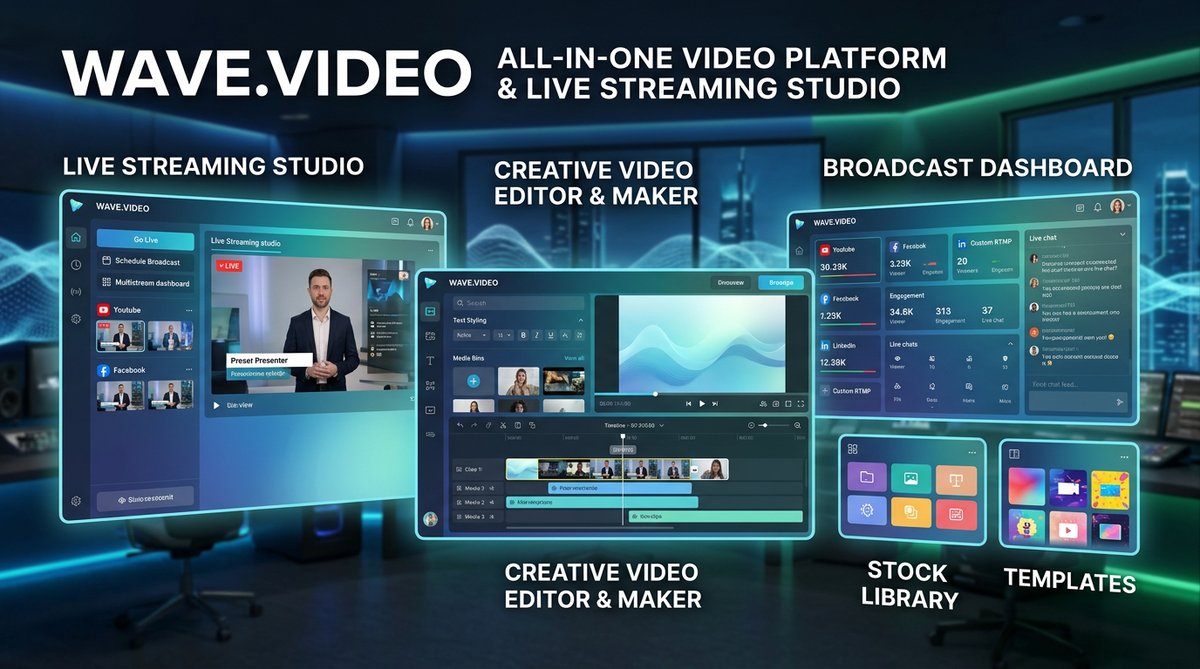
Enter Wave.video—an all-in-one video platform that promises to consolidate five essential products into a single, affordable solution: video editor, live streaming studio, video recorder, thumbnail maker, and video hosting. With over 2.9 million users worldwide and access to 200 million stock assets, Wave.video has positioned itself as a comprehensive video marketing powerhouse.
But in a market crowded with competitors like Canva, InVideo, and Adobe Express, does Wave.video truly deliver on its promise of simplifying video creation while maximizing engagement? After analyzing real-world performance data, user reviews, and comparing it against alternatives, here’s everything you need to know about Wave.video in 2026.
What Is Wave.video?
Wave.video is a cloud-based video marketing platform founded in 2011 by Animatron, designed to empower creators of all skill levels to produce professional-quality video content. Unlike single-purpose tools that force you to piece together workflows across multiple subscriptions, Wave.video integrates the entire video production cycle—from creation and editing to hosting and distribution—into one cohesive platform.
The platform’s core philosophy is accessibility: whether you’re a seasoned videographer or someone who’s never edited a video before, Wave.video’s AI-powered tools and intuitive interface remove technical barriers while maintaining professional output quality.
Key Platform Components:
- Online Video Editor: Browser-based editing with drag-and-drop functionality, no software download required
- Live Streaming Studio: Multistream to 10+ platforms simultaneously with customizable branding
- Video Recording: Record screen, webcam, or both with pause/resume functionality
- Thumbnail Maker: Create eye-catching thumbnails with AI-assisted background removal
- Video Hosting: Secure hosting with customizable players and detailed analytics
- Stock Library: 200M+ royalty-free videos, images, and 300,000+ audio tracks
Core Features Deep-Dive: What Makes Wave.video Stand Out
AI-Powered Video Editor
Wave.video’s browser-based editor combines simplicity with powerful AI-driven automation:
- Auto-Generated Captions: AI-powered speech-to-text generates accurate captions with customizable styles, fonts, and colors. Edit captions directly in the timeline for perfect synchronization.
- Auto-Resize Tool: Automatically adapt your video to 30+ formats including YouTube (16:9), Instagram Stories/Reels (9:16), TikTok (9:16), LinkedIn (1:1), and Facebook. One click transforms landscape videos into vertical social content.
- Text-to-Video Generator: Transform blog posts or scripts into engaging videos using AI. The platform analyzes your text, suggests relevant visuals from the stock library, and assembles a complete video draft.
- Smart Background Removal: AI-powered background removal for images and videos eliminates green screen requirements. Perfect for product demos and professional presentations.
- Voice Cloning & Text-to-Speech: Generate natural-sounding voiceovers in multiple languages and accents. The AI voice cloning feature creates consistent narration across your content library.
- Auto Beat Sync: Automatically sync video transitions and cuts to the rhythm of your background music, creating professional-looking results without manual frame-by-frame editing.
Multi-Platform Live Streaming Studio
Wave.video’s live streaming capabilities set it apart from pure editing tools:
- Multistreaming: Broadcast simultaneously to YouTube, Facebook, LinkedIn, Twitch, Instagram, and custom RTMP destinations. The Business plan supports streaming to 10 channels at once.
- Customizable Scenes: Pre-plan your live stream with multiple scenes featuring different layouts, graphics, and overlays. Switch between scenes seamlessly during broadcast.
- Guest Management: Invite up to 12 guests (Business plan) to join your stream with multi-camera support. Each guest can broadcast from 4 cameras and share 4 screens simultaneously.
- Pre-Recorded Video Streaming: Schedule and stream pre-recorded videos as “live” broadcasts, perfect for maintaining consistent streaming schedules without being tied to your desk.
- Branded Overlays: Add custom logos, lower thirds, banners, and graphics that maintain your brand identity throughout the stream.
- Cross-Channel Chat Integration: Monitor and respond to comments from multiple platforms in one unified dashboard during live broadcasts.
Video Hosting & Analytics
Beyond creation, Wave.video provides comprehensive hosting solutions:
- Custom Video Player: Fully branded player with your logo and color scheme. Control viewer experience with customizable buttons and CTAs.
- Auto-Generated Landing Pages: Every hosted video automatically gets a shareable landing page with embedded player, perfect for email campaigns and social sharing.
- Password Protection: Secure sensitive content with password-protected hosting for client presentations or exclusive member content.
- Detailed Analytics: Track play counts, watch time, engagement patterns, and viewer retention. Analytics help identify which content resonates with your audience.
- SEO Optimization: Auto-generated video rich snippets improve search visibility. Videos hosted on Wave.video can rank in Google search results.
- Email Embedding: Generate embed codes optimized for email clients, allowing videos to play directly in marketing emails.
Creative Assets & Templates
Wave.video’s extensive content library accelerates production:
- 200M+ Stock Media: Access videos, images, and audio from top providers including Storyblocks, Shutterstock elements, and Unsplash—all royalty-free.
- 1,000+ Video Templates: Pre-designed templates organized by industry (business, e-commerce, education, real estate), platform (Instagram, YouTube, TikTok), and purpose (ads, tutorials, promos).
- Seasonal & Trending Templates: Updated library includes templates for current events, holidays, and trending topics to capitalize on timely content opportunities.
- Customizable Layouts: Over 30 different video layouts including side-by-side, picture-in-picture, collages, and device mockups.
- Animated Text Effects: Hundreds of text animation presets with full customization of fonts, colors, and timing.
Pricing Breakdown: What You Actually Get
Wave.video offers tiered pricing designed to scale with your needs (based on March 2026 data):
| Plan | Monthly Price | Annual Price | Key Features |
|---|---|---|---|
| Free | $0 | $0 | 15-min videos with watermark, 2M stock assets, live streaming with watermark (2 channels, 6 guests, 1 hour max), 5 video embeds, 10GB traffic/month |
| Streamer | $20 | $16 ($192/year) | 5-min videos no watermark, live streaming to 5 channels (10 guests, 4 hours, 1080p), 2 cameras + 3 screen shares per guest, 20 video embeds, 150GB traffic, 30GB storage |
| Creator | $30 | $24 ($288/year) | 30-min videos, 200M+ stock assets, stylish captions, background removal, text-to-speech, same live streaming as Streamer, 20 embeds, 150GB traffic, 30GB storage |
| Business | $60 | $48 ($576/year) | 2-hour videos at 60fps, advanced live streaming to 10 channels (12 guests, 12 hours, 1080p), 4 cameras + 4 screens per guest, 200 video embeds, 500GB traffic, 500GB storage, shared logins, advanced permissions |
Value Analysis
At $24/month (annual Creator plan), Wave.video costs significantly less than maintaining separate subscriptions for editing ($10-20), live streaming ($15-30), and hosting ($10-20). The all-in-one approach delivers substantial savings while simplifying workflows.
Additional Costs: After included limits, users pay $0.01 per GB of bandwidth and $0.20 per embedded video beyond plan limits. Storage overages cost $0.10 per GB/month (Business plan only).
Pros & Cons: The Honest Assessment
What Wave.video Does Exceptionally Well
- True All-in-One Solution: Eliminates the need for separate tools, saving both money and the hassle of moving files between platforms.
- Live Streaming Excellence: The multistreaming capabilities rival dedicated platforms like StreamYard or Restream at a fraction of the cost.
- Browser-Based Convenience: No software installation required. Edit videos on any device with an internet connection, from any location.
- Extensive Stock Library: 200M+ assets eliminate the need for additional stock media subscriptions. The integrated search makes finding relevant content fast.
- AI Time-Savers: Auto-captioning, auto-resizing, and text-to-video features genuinely reduce production time by 50-70% for routine content.
- Social Media Optimization: Pre-configured formats for every major platform ensure your content looks perfect wherever it’s published.
- Flexible Pricing: The free plan is genuinely useful for testing, and annual discounts (20% off) make paid plans affordable.
- Customer Support: Responsive support team with extensive documentation, video tutorials, and webinars.
Where Wave.video Falls Short
- Video Length Restrictions: Even the Business plan caps videos at 2 hours, which may limit long-form content creators (though this covers 99% of use cases).
- Limited Advanced Effects: While capable for most projects, Wave.video lacks the granular control and advanced effects of professional tools like After Effects or Premiere Pro.
- Internet Dependency: Being cloud-based means slow or unstable internet connections significantly impact performance. No offline editing capability.
- Storage Costs: Free and Creator plans cannot purchase additional storage beyond included limits, forcing upgrades to Business plan for heavy users.
- Learning Curve for Live Streaming: While the editor is beginner-friendly, mastering the live streaming studio’s scene management and guest coordination requires practice.
- Mobile Experience: The platform is optimized for desktop browsers. Mobile editing capabilities are limited compared to native apps.
Competitor Comparison: Wave.video vs. The Field
Wave.video vs. Canva Video
| Criteria | Wave.video | Canva Video |
|---|---|---|
| Best For | Video-first creators, live streamers, marketers | Design-first creators, social media graphics + video |
| Price (Annual) | $24/month (Creator) | $10/month (Pro) |
| Live Streaming | ✅ Advanced multistreaming studio | ❌ Not available |
| Video Hosting | ✅ Included with custom player | ❌ Not available |
| Stock Assets | 200M+ videos, images, audio | 100M+ photos, graphics (limited video) |
| Graphic Design | Basic (thumbnail maker) | ✅ Comprehensive design suite |
The Verdict: Choose Canva if you need a full design suite for graphics, presentations, and occasional videos. Choose Wave.video if video is your primary content format and you need live streaming or hosting capabilities.
Wave.video vs. InVideo
InVideo is Wave.video’s closest competitor, offering similar template-based video creation with AI tools.
Wave.video Advantages:
- Superior live streaming capabilities with multistreaming
- Integrated video hosting with analytics
- More flexible pricing (lower entry point)
- Better audio library (300K+ tracks vs. limited selection)
InVideo Advantages:
- 5,000+ templates vs. Wave.video’s 1,000+
- Stronger team collaboration features
- More aggressive AI automation (text-to-video)
- Slightly more advanced color grading tools
The Verdict: Choose InVideo if you prioritize maximum template variety and team collaboration. Choose Wave.video if you need live streaming, hosting, or prefer an all-in-one platform.
Wave.video vs. Vimeo
Vimeofocuses primarily on video hosting and distribution with basic editing tools. For more insights, see our Waymark AI Video Tool Review 2026: Script-to-TV-Ad in Minutes.
Wave.video Advantages:
- Full-featured video editor (Vimeo’s is basic)
- Live streaming studio with multistreaming
- 200M+ stock assets included
- Lower starting price ($16 vs. $20 for comparable plans)
Vimeo Advantages:
- Better video quality/compression for hosting
- Stronger privacy controls and security
- More advanced analytics and engagement tools
- Better integration with professional workflows
The Verdict: Choose Vimeo if you primarily need premium hosting with advanced analytics. Choose Wave.video if you need a complete creation-to-distribution solution.
Real-World Use Cases: Who Benefits Most?
Social Media Managers
Managing content across Instagram, TikTok, YouTube, LinkedIn, and Facebook is effortless with Wave.video’s auto-resize feature. Create one master video, then export optimized versions for each platform with a single click. The scheduling calendar helps maintain consistent posting across channels.
YouTube Content Creators
The combination of video editor, thumbnail maker, and direct YouTube integration streamlines the entire workflow. Create engaging videos with stock B-roll, generate professional thumbnails, and publish directly—all from one platform. The auto-caption feature ensures accessibility and improves SEO.
Live Stream Producers
Podcasters, educators, and live event organizers benefit from Wave.video’s multistreaming capabilities. Broadcast to YouTube, Facebook, and LinkedIn simultaneously while maintaining professional branding with custom overlays. The guest management system makes remote interviews and panel discussions seamless.
Marketing Agencies
Agencies managing multiple client accounts appreciate Wave.video’s video hosting with white-label options. Create branded video players for each client, host their content securely, and provide detailed analytics reports. The Business plan’s team permissions keep projects organized.
E-Commerce Brands
Product demo videos are critical for online sales. Wave.video’s background removal, product templates, and quick-export options make creating professional product videos scalable. Upload product shots, apply templates, add captions, and publish to your website—all in under 30 minutes.
Educators & Course Creators
Create engaging educational content with screen recording, webcam overlay, and voiceover tools. The text-to-video feature transforms lesson plans into visual content. Password-protected hosting keeps course materials secure for enrolled students only.
System Requirements & Performance
Recommended Specifications
- Internet Connection: Minimum 10 Mbps download, 5 Mbps upload (25+ Mbps recommended for live streaming)
- Browser: Latest versions of Chrome, Firefox, Safari, or Edge (Chrome recommended for best performance)
- RAM: 4GB minimum, 8GB+ recommended for smooth editing
- Processor: Dual-core 2.0 GHz or better
- Display: 1366×768 minimum resolution (1920×1080 recommended)
Performance Notes
As a cloud-based platform, Wave.video’s performance depends heavily on internet speed and stability. With a reliable connection, rendering times are fast—typically 1-3 minutes for a 5-minute 1080p video. Live streaming requires consistent upload bandwidth; the platform provides real-time network diagnostics to prevent connection drops.
The browser-based architecture means you’re not limited by local hardware storage, though editing performance may lag slightly compared to native desktop applications on high-end machines.
Expert Tips for Getting the Most from Wave.video
Maximize AI Features
- Use Templates as Starting Points: Don’t start from scratch. Find a template close to your vision, customize it, and save time while maintaining professional quality.
- Batch Create Content: Use the auto-resize feature to create versions for all platforms at once. Export landscape, square, and vertical versions in one session.
- Leverage Text-to-Video: Transform blog posts into video content by pasting text and letting AI select relevant visuals. Review and refine rather than building from scratch.
Optimize Live Streaming
- Pre-Build Scenes: Create and save scene templates for different segments (intro, main content, Q&A, outro). Switch seamlessly during live broadcasts.
- Test Before Going Live: Use private test streams to check audio levels, camera positioning, and graphics before broadcasting to your audience.
- Engage with Chat: The cross-platform chat integration is powerful—assign a team member to monitor and respond to comments from all platforms during streams.
Hosting & Distribution Hacks
- Create Landing Pages for Every Video: Wave.video’s auto-generated landing pages are shareable, SEO-friendly, and track views independently from social platforms.
- Use Analytics to Refine Strategy: Track which videos have the highest retention rates, then analyze what made them successful and replicate those elements.
- Embed Strategically: Use email embed codes for newsletters—video in email increases click-through rates by up to 300%.
Final Verdict: Is Wave.video Worth It in 2026?
Rating: ★★★★☆ (4.5/5)
Wave.video delivers exceptional value as an all-in-one video marketing platform, consolidating tools that would typically require 3-4 separate subscriptions. At $24/month for the Creator plan, it’s positioned perfectly for serious content creators and marketers who need more than basic editing but don’t require Hollywood-level production capabilities.
You Should Choose Wave.video If:
- You create video content regularly for social media, marketing, or YouTube
- You need live streaming capabilities with multistreaming to multiple platforms
- You want integrated video hosting with custom branding and analytics
- You value workflow efficiency and prefer managing everything in one platform
- You need access to extensive stock media without additional subscriptions
- You’re a social media manager handling multiple platforms and formats
- You want AI-powered tools that genuinely save production time
You Should Skip Wave.video If:
- You primarily need graphic design tools (Canva is better suited)
- You require advanced color grading and effects (consider Premiere Pro or DaVinci Resolve)
- You work offline frequently without reliable internet access
- You need to edit videos longer than 2 hours regularly
- Your primary need is premium hosting without editing (Vimeo offers better hosting features)
- You only create videos occasionally (free tools might suffice)
The Bottom Line
Wave.video succeeds by focusing on what video marketers actually need: fast creation, multi-platform optimization, live streaming, and distribution—all without switching between tools. The 2026 platform has matured significantly, with AI features that genuinely accelerate workflows rather than serving as marketing gimmicks.
For the vast majority of content creators, marketers, and small businesses, Wave.video offers the perfect balance of capability, usability, and affordability. It won’t replace professional-grade tools for film production, but that’s not its purpose. It excels at making consistent, engaging video content scalable and sustainable for teams of any size.
Try the free plan to test the interface and features before committing.The free version is functional enough to evaluate whether Wave.video fits your workflow, with no credit card required. For more insights, see our Best AI Video Tools for Product Demos in 2026: Showcase, Convert & Sell More.
Last updated: March 2026 | Pricing and features based on Wave.video official data and verified user reviews







