AI Video Pricing in 2026: What You’re Actually Paying (Not What the Homepage Says)
If you’ve tried to compare AI video tool pricing lately, you’ve probably noticed something: it’s gotten harder to compare, not easier. Some platforms bill per second. Some bill in credits. Some have quietly moved from monthly credit buckets to per-task charges. Same workload, different bill.
Understanding AI video pricing 2026 is crucial for making informed decisions about your video production costs.
Here’s what’s actually going on with pricing in mid-2026, and — more usefully — what a real minute of finished video costs across the tools solopreneurs and content creators are actually using.
As we look towards AI video pricing 2026, it’s essential to analyze how these costs will evolve.
The Big Shift: Budget Tiers Are Getting Cheaper, Flagship Tiers Aren’t
The clearest pattern this year: per-second pricing at the budget tier keeps dropping, while flagship-tier pricing holds steady or climbs. Google’s Veo 3.1 is the clearest example — it now ships in three tiers instead of one:
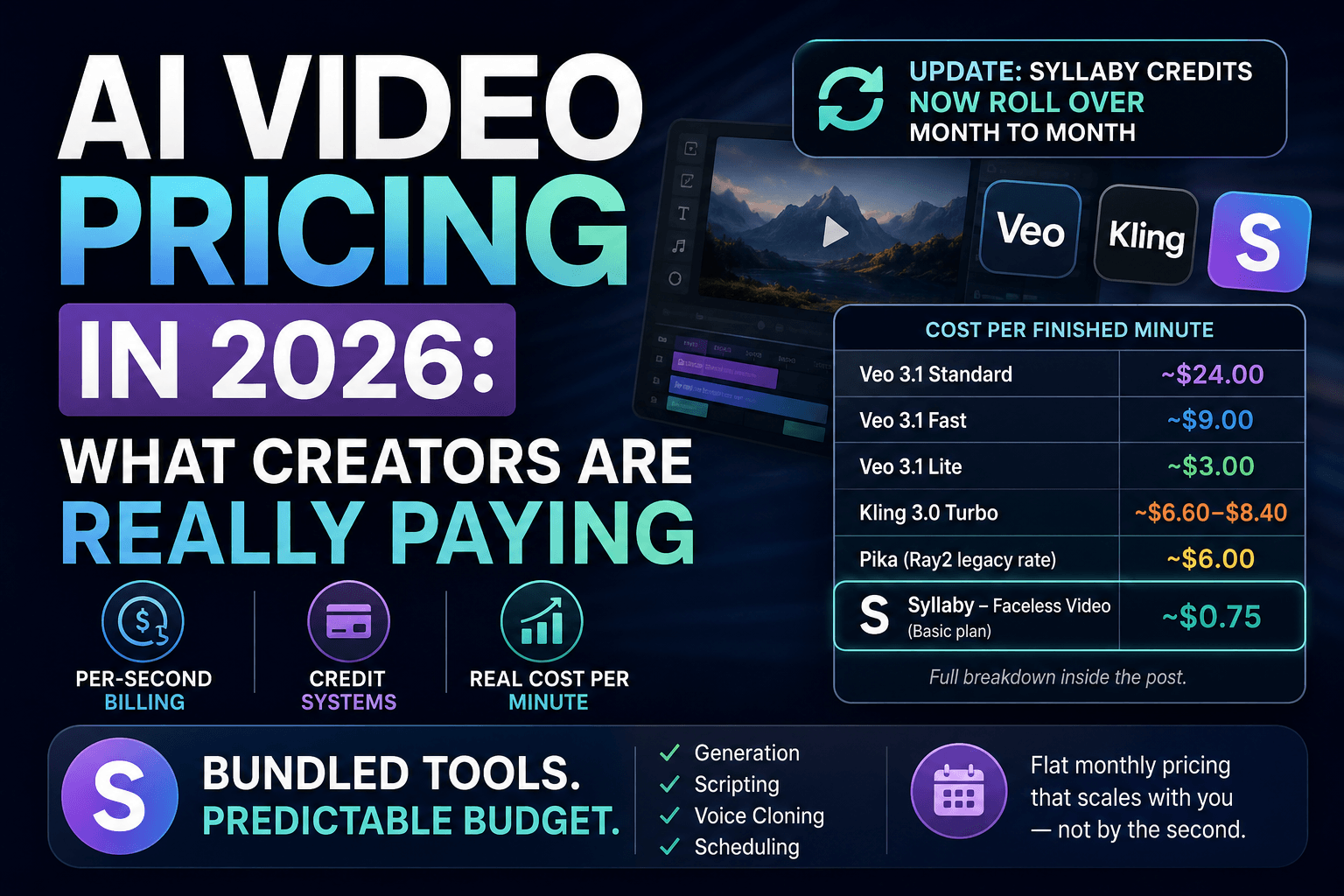
- Veo 3.1 Standard: $0.40/second (~$24/minute)
- Veo 3.1 Fast: $0.15/second (~$9/minute)
- Veo 3.1 Lite: $0.05/second (~$3/minute)
That’s a real gap. The “best” version of a model and the “usable” version of the same model can be 8x apart in cost. If you’re pricing out a tool based only on its cheapest headline number, you may be looking at a tier that doesn’t actually produce the quality you need.
The Other Shift: Credit Buckets → Per-Task Billing
A number of platforms have quietly moved away from flat monthly credit allowances toward billing per generation task. On paper this sounds neutral, but it changes how predictable your spend is — a month where you generate more revision passes or longer clips can cost meaningfully more than a “typical” month, even on the same plan.
If you’re the kind of creator who batches content once a week (most solopreneurs are), this matters. Usage-based billing punishes exactly the workflow you’re likely to have: generate in bursts, iterate a few times, move on.
What a Minute of Video Actually Costs Right Now
Here’s the real math, using published rates as of mid-2026:
*(Syllaby figures are based on the Basic plan’s $29/month for 500 credits, at roughly $0.058 per credit. Higher-tier plans change the per-credit cost.)*
🔄 Syllaby credits now roll over month to month.
This is a bigger deal than it sounds. Most AI video platforms still run on “use it or lose it” credit cycles — if you don’t burn your full allocation by the reset date, the unused balance just disappears. For creators who batch content unevenly (a heavy production week followed by a lighter one), that’s real money left on the table every month under the old model. Rollover credits mean a slow month doesn’t cost you what you didn’t use, and a busy month can draw on what you banked. It’s a meaningful shift for anyone whose output isn’t perfectly consistent week to week — which, if you’re a solopreneur, is most of the time.
A few things jump out here:
- Faceless video content is dramatically cheaper than raw model generation. If your format is avatar-led or faceless explainer-style content (which, if you’re reading this, it probably is), you’re not paying flagship per-second rates — you’re paying a fraction of it.
2. The “premium” models cost 10–15x more per minute than the budget options. Unless your use case specifically needs top-tier photorealism, that gap is real money.
3. Bundled platforms smooth out the volatility. A flat monthly plan means you’re not recalculating your budget every time a lab changes its per-second rate.
What This Means for Your Monthly Content Budget
Say you’re producing eight short-form videos a month, averaging 45 seconds each — a realistic cadence for a solopreneur posting consistently without burning out. That’s 6 minutes of finished video a month.
– On Veo 3.1 Standard, direct: ~$144/month, just for generation
– On Kling 3.0 Turbo: ~$40–$50/month
– On a faceless-video credit system like Syllaby’s Basic plan: ~$4.50/month in credits, inside a $29/month flat subscription that also covers scripting, voice cloning, and scheduling
That last point is the real story. You’re not just comparing generation cost — you’re comparing generation cost *plus* everything else you’d otherwise need a separate tool (or three) for.
How to Budget Predictably in a Market That Keeps Shifting
Three practical rules for the rest of 2026:
- Price by the tier you’ll actually use, not the cheapest headline number on the pricing page. If a “Lite” tier doesn’t meet your quality bar, don’t include it in your comparison.
- Favor flat-rate or credit-bucket platforms over pure per-task billing if your output volume varies month to month — which, for most solopreneurs, it does. And if you’re choosing between credit-based platforms, check whether unused credits roll over. That one detail can be the difference between a plan that quietly wastes your budget in slow months and one that actually flexes with your real production schedule.
- Re-check pricing quarterly. This space moves fast enough that a number you confirmed in March may already be stale by July.
If predictable monthly cost matters more to you than chasing the single “best” model, a bundled platform is the more sustainable move. Syllaby keeps generation, scripting, and scheduling under one flat subscription instead of a per-second meter running in the background — which is a meaningfully different budgeting experience than paying API rates directly.
👉 [See current Syllaby plans and try it free for 7 days]
Frequently Asked Questions
Why is AI video pricing so hard to compare across tools?
Because pricing models differ — some charge per second, some per credit, some per task — and the same word (“credit”) can represent very different amounts of generated video depending on the platform and model tier.
Is the cheapest AI video tool always the best value?
Not necessarily. A cheap per-second rate on a lower-quality tier may cost you more in the long run if you need to regenerate clips to hit the quality you actually want.
Do bundled platforms like Syllaby save money compared to using models directly?
For creators making faceless or avatar-led short-form content, yes — the effective cost per minute through a bundled credit system is typically well below the direct API rate for a comparable model, and it includes tools (scripting, scheduling) you’d otherwise pay for separately. Syllaby also now rolls unused credits over to the next month, which most competing platforms still don’t offer.
How often does AI video pricing change?
Frequently enough that a specific number is worth re-verifying every few months. Several platforms adjusted pricing structures within the first half of 2026 alone.